Reconnect agent sessions after WebSocket loss
- Author
 Drew YoungwerthSoftware Engineer
- Published
- Section
- AI Agents
- Length
- 7 min read3 sources cited
Treat every WebSocket reconnect as a new transport, then explicitly resume the existing agent session. Send a stable session ID and the last acknowledged event sequence, replay only later events, and advance the acknowledgement after rendering. That closes disconnect gaps without showing the same agent output twice.
Symptom: the socket reconnects but the agent starts over
The connection indicator returns to green, yet the interface opens an empty conversation, loses the current tool run, or treats the user as a new participant.
Likely cause
The application equates a WebSocket connection with an agent session. They are different layers.
A reconnected socket is a new transport connection and does not by itself restore the application session. Cloudflare’s WebSocket lifecycle documentation, last updated June 3, 2026, says onConnect runs when a new connection is established and that every connected client has a unique Connection object. Per-connection state belongs to that connection; it is not a stable identity for a conversation or run.
The protocol has the same boundary. RFC 6455, published in December 2011, defines a closed WebSocket in terms of its underlying TCP connection. It allows a client to establish another connection after abnormal closure, but it does not define how an application conversation resumes. That mapping is your protocol’s job.
Check
Log these values together for the initial connection and the reconnect:
- transport connection ID;
- application session ID;
- agent or run ID;
- close code and whether the close was clean;
- the first application message sent after
open.
Then force a disconnect during an active run. If the transport ID changes—as it should—but the client sends no previous session ID, the server has no application-level instruction to resume. If the session ID is derived from the connection ID, the design guarantees a new session on every reconnect.
Also check where session state lives. The choice is tied to where the agent runs and which process owns its state. State kept only in a browser component or a disposable server process cannot be recovered merely by opening another socket.
Fix
Give the application session its own stable ID. Create it when the conversation or run begins, retain it across transport loss, and send it in the first application-level message on every new socket. Treat open as “transport available,” not “session restored.” Show the session as resumed only after the server accepts that ID and returns a resume response.
A minimal handshake needs to distinguish intent explicitly:
start: create a new application session;resume: attach this new transport to an existing session;resume_ok: confirm the session and the replay boundary;resume_rejected: say that the requested session cannot be resumed.
Do not use a transport connection ID as the session ID. Do not silently fall back from a failed resume to a new session: that turns a recoverable error into an apparently successful but empty interface. The cost is a small application protocol and persistent session lookup. The wrong answer is avoiding that work by storing the entire conversation only on the socket.
Symptom: the session returns with a hole in its timeline
The interface restores the right conversation, but output produced during the disconnect is missing. A tool may have completed or the agent may have emitted later status events, while the client resumes from whatever arrives after the new socket opens.
Likely cause
The client identifies the session but not its position within that session. The client needs a stable session identity and a cursor or sequence number to request events missed while disconnected.
WebSocket reconnection restores a route for future messages; it does not retrieve past messages. This matters when agent work continues without a viewer, including delayed or recurring agent work. If events 128 through 134 occurred while the browser was offline, subscribing to live event 135 leaves a permanent gap.
Check
Run a controlled interruption:
- Record the last event visible in the interface.
- Disconnect the client while allowing the agent session to continue.
- Record every server-side event created during the interruption.
- Reconnect and inspect the first resume message.
- Compare the interface with the server’s ordered event sequence.
The check fails if events have no monotonic sequence within the session, the client does not retain its last position, or the resume request contains only the session ID. It also fails if ordering depends on arrival time at the new socket: arrival after reconnection says nothing about what was produced during the gap.
Fix
Assign each resumable event an ordered cursor within its application session. A simple integer sequence is sufficient when one server-side authority assigns it. Return the cursor with every event, and keep the client’s last committed cursor separately from the WebSocket object.
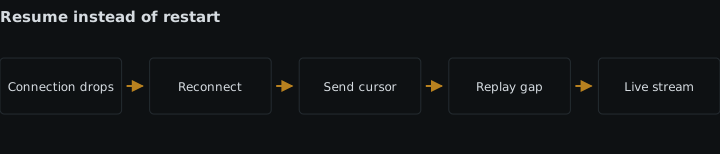
On reconnect, send a request equivalent to resume session s-42 after sequence 127. The server must then send the retained events for that session whose sequence is greater than 127 before switching the client to live delivery.
That requirement implies an ordered event record somewhere outside the lost socket. Retaining it costs storage and cleanup work, but without it the server cannot answer a request for missed events. Do not substitute timestamps unless the application has already defined a total order for equal or skewed times; the supplied facts support a cursor or sequence number, not an assumption that wall-clock time is an adequate cursor.
The wrong fix is to send the current session snapshot and immediately append live events without a defined boundary. Unless the snapshot and live stream agree on a sequence, an event created between those operations can still disappear or arrive twice.
Symptom: replay fills the gap but repeats output
After reconnecting, the interface shows a tool result twice, repeats status rows, or appends the same streamed fragment again. The server did replay events, but the client rendered records that it had already applied.
Likely cause
The replay begins from an inferred position—such as the last event received—or from the start of the session. Receipt is not the same as successful application. The socket can disappear after a frame reaches the client but before the interface commits it, or after rendering but before a separate acknowledgement reaches the server.
MDN’s WebSocket client guide, last modified November 22, 2025, documents distinct open, error, and close events; an error is followed by close, and creating another WebSocket starts another connection. None of those browser events supplies an application replay position.
Check
Instrument three moments for every session event: received, rendered or committed, and cursor acknowledged. Include the session ID and sequence in each record.
Then disconnect at two boundaries: after receipt but before rendering, and after rendering but before the next event. On reconnect, verify both the requested cursor and the first replayed sequence. If the client says after 41, the first replayed event must be 42. If the interface already committed 42, its stored cursor must also be 42 before it asks to resume.
Use event sequences, not text comparison, to detect duplicates. Two legitimate model fragments or tool statuses can contain identical text; identical content does not prove identical identity.
Fix
Replaying from an acknowledged cursor avoids both gaps and duplicate rendering in the interface. Define “acknowledged” as the highest contiguous sequence the client has committed to its displayed state. Advance that cursor only after applying the event, retain it across transport replacement, and request strictly later events on resume.
For example, if the committed cursor is 41, the server may replay 42 and 43. After the client applies 42, it advances the cursor to 42. If the connection drops before 43 is applied, the next resume request asks for events after 42, so 43 returns while 42 does not.
The client should also ignore an incoming sequence at or below its committed cursor. That guard handles a repeated delivery without duplicating a row or text fragment. It is not a replacement for replay: dropping old events prevents duplicates, while requesting every event after the acknowledged cursor prevents gaps. Both sides must use the same exclusive boundary.
Roll out any change to session IDs, cursor fields, or boundary semantics with compatible client and server versions. A canary rollout for agent changes is useful here because an old client interpreting after as inclusive while a new server treats it as exclusive will reproduce the duplicate at the version boundary.
The cost is bookkeeping in both the event store and the renderer, plus tests at each disconnect boundary. The wrong answer is clearing the interface and redrawing everything after every reconnect: it hides some duplicate-state bugs, increases visible disruption, and still does not prove that events created during the loss were recovered.
Sources
- Cloudflare’s WebSocket lifecycle documentationdevelopers.cloudflare.com
- RFC 6455rfc-editor.org
- MDN’s WebSocket client guidedeveloper.mozilla.org
See also
A practical method for capturing agent tasks, state, tools, production failures, labels, privacy review, and a prompt-tuning holdout.
Release model, prompt, tool, and policy changes to a sticky cohort, measure the result, and roll back without stranding side effects.
Bind feedback to complete agent runs, separate correctness from presentation, and turn human corrections into reusable evaluation targets.
Compare plain loops, framework harnesses, and managed runtimes by failure recovery, tool portability, prompt control, tracing, and upgrades.