Collect Structured Input with MCP Form Elicitation
- Author
 Joseph TrasattiMember of technical staff
- Published
- Section
- MCP
- Length
- 5 min read3 sources cited
Use form elicitation when an MCP server needs non-sensitive, structured choices from a user. Send an `elicitation/create` request with a restricted JSON schema, validate accepted content again on the server, and branch explicitly for accept, decline, and cancel. Never put passwords, access tokens, API keys, or other secrets in the form.
Prerequisites
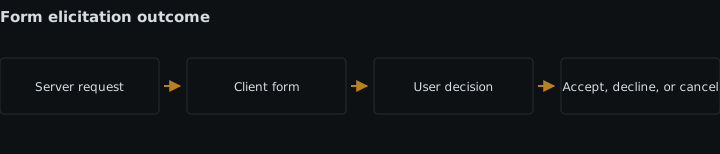
Before sending a form request, confirm that the client declared support for form elicitation during initialization. The MCP elicitation specification dated 2025-11-25 defines elicitation as a server-to-client request: the server describes the input it needs, while the client controls how the request is shown to the user.
Choose form mode only when the requested values are non-sensitive and can be represented by the restricted schema. If the task needs a password, access token, API key, private credential, or another secret, stop here and design an out-of-band flow instead.
Steps
-
Define the decision the server cannot make safely on its own.
Ask only for values needed to continue the current operation. For example, an export tool might need the output format, a row limit, and whether to include column headings. Those are user choices; guessing them could produce the wrong artifact.
Keep the request narrower than a general settings screen. Each field should affect the pending operation, and its description should tell the user what changes when they choose a value. If you are defining reusable arguments supplied before a prompt runs, use validated MCP prompt arguments instead. Form elicitation is for information the server discovers it needs while handling an active request.
-
Express the fields as a restricted JSON schema.
Form elicitation does not accept arbitrary JSON Schema. The protocol’s 2025-11-25 schema definitions constrain the request to an object whose properties use the supported primitive field schemas. Build the smallest schema that represents the decision, and use constraints such as
required,enum,minimum, and `maximum where the field type permits them.This export request gives the client enough information to render two required fields and one optional field:
{
  "type": "object",
  "properties": {
    "format": {
      "type": "string",
      "title": "Export format",
      "description": "Choose the file format to generate.",
      "enum": ["csv", "json"]
    },
    "maxRows": {
      "type": "integer",
      "title": "Maximum rows",
      "description": "Limit the number of rows included in the export.",
      "minimum": 1,
      "maximum": 10000,
      "default": 1000
    },
    "includeHeaders": {
      "type": "boolean",
      "title": "Include column headings",
      "default": true
    }
  },
  "required": ["format", "maxRows"]
}
Do not add unsupported composition or nested application objects merely because a full JSON Schema validator accepts them. A client implements the protocol’s restricted schema, not every JSON Schema feature. Split a complicated interaction into separate, meaningful requests or redesign the operation around simpler inputs.
-
Send the form with
elicitation/create.Put a short explanation in
messageand the form definition inrequestedSchema. Form mode is the default, but declaring it makes the intended interaction clear when the same server also uses URL elicitation.{ "jsonrpc": "2.0", "id": 42, "method": "elicitation/create", "params": { "mode": "form", "message": "Choose the settings for this export.", "requestedSchema": { "type": "object", "properties": { "format": { "type": "string", "enum": ["csv", "json"] }, "maxRows": { "type": "integer", "minimum": 1, "maximum": 10000 }, "includeHeaders": { "type": "boolean", "default": true } }, "required": ["format", "maxRows"] } } }The message should identify the pending action rather than pressure the user to accept it. The user remains in control of whether the operation continues.
-
Branch on accept, decline, and cancel before reading content.
The result’s
actionis not a decorative status. A user can accept, decline, or cancel, and the server must handle all three outcomes. Readcontentonly after an accepted result.const result = await requestElicitation(params); switch (result.action) { case "accept": return createExport(validateExportInput(result.content)); case "decline": return { status: "not_started", message: "The export was not created because its settings were declined." }; case "cancel": return { status: "cancelled", message: "The export request was cancelled before settings were submitted." }; default: throw new Error("Unsupported elicitation action"); }Treat decline and cancel as normal control-flow outcomes, not malformed replies. A decline means the user chose not to provide the requested information. A cancel means the interaction ended without an accepted submission. In both cases, stop or take a documented fallback path; do not run the operation with guessed values.
Preserve that distinction in logs and tool results because it changes the next debugging question. If an accepted request later fails, investigate the returned values and downstream operation. If the user declined or cancelled, there may be no tool failure to diagnose. For protocol or downstream errors, follow the checks for debugging a failing MCP tool call.
-
Validate accepted content again on the server.
Client-side rendering and validation improve the interaction, but accepted content is still external input. Confirm that required properties exist, values have the expected primitive types, enumerated strings are allowed, and numeric values remain within the declared bounds. Reject extra properties if the operation does not use them.
Keep this validation next to the operation that consumes the data. The schema sent to the client and the server-side validator should express the same contract; otherwise a client can accept a value that the operation later rejects. Return a specific protocol or tool error rather than silently coercing an invalid value into something else.
-
Keep secrets out of every form field.
The MCP security best-practices specification says servers must not use form mode to collect sensitive information. That rules out password boxes, access-token fields, API keys, session secrets, private credentials, and disguised equivalents such as a generic field labelled “configuration value.” Changing the title or masking the characters does not change what the server is collecting.
If the operation requires sensitive input, do not add that property to
requestedSchema. Move the sensitive interaction to an appropriate external destination and use MCP URL elicitation for secure out-of-band interaction. The form may still collect non-sensitive choices surrounding that flow, but it must not carry the secret itself. -
Test all outcomes, not only the submitted form.
Run the handler with an accepted valid payload, an accepted invalid payload, a decline result, and a cancel result. Confirm that only the valid accepted payload reaches the protected operation. Also test a client without form-elicitation support so the server produces a controlled error or documented fallback instead of waiting for an interaction that cannot occur.
Expected result
The server sends a form-elicitation request containing a restricted JSON schema for non-sensitive fields. Valid accepted content is checked again and used by the pending operation. Declined and cancelled requests stop or follow an explicit fallback without reading missing content. Passwords, tokens, API keys, and other secrets never enter the form.
Sources
- MCP elicitation specification dated 2025-11-25modelcontextprotocol.io
- 2025-11-25 schema definitionsmodelcontextprotocol.io
- MCP security best-practices specificationmodelcontextprotocol.io
See also
How MCP URL elicitation keeps OAuth credentials, payment details, and other secrets outside the client while preserving consent and completion tracking.
How MCP clients and servers advertise extensions, gate behavior on mutual support, and design versioned third-party contracts with a core fallback.
How MCP headers let gateways route Streamable HTTP requests while servers enforce agreement with the JSON-RPC body.
Implement secure MCP session creation, propagation, recovery, and termination for clients and servers using Streamable HTTP.