Use Tools Inside MCP Sampling Requests
- Author
 Joseph TrasattiMember of technical staff
- Published
- Section
- MCP
- Length
- 12 min read3 sources cited

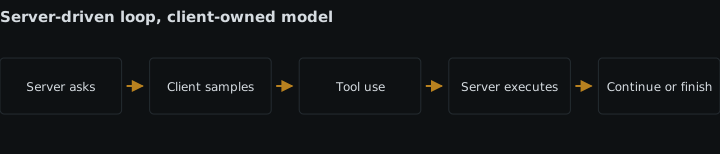
Advertise `sampling.tools` from the client, then have the server send tool definitions and a deliberate `auto`, `required`, or `none` choice. The client applies its own approval and policy. When the model returns tool use, the server executes it, appends matched results, and samples again until completion.
Prerequisites
Use the 2025-11-25 protocol version at both ends. Tool-enabled sampling was added in that release: the November 2025 MCP release announcement identifies tool definitions, tool-choice behavior, parallel calls, and server-side agent loops as the new sampling surface. An implementation using an older schema cannot safely infer support from basic sampling alone.
You need two separate pieces before starting:
- A client that can sample a model, translate MCP tool definitions into that model provider’s format, apply user and application policy, and return
tool_usecontent. - A server that owns the actual tool implementation and can execute it inside the server’s security boundary. The model selects a tool and proposes arguments; it does not receive the server’s credentials or execute the operation itself.
Keep those responsibilities separate. Sampling lets the server use model access provided by the client, while the client retains control over model selection, approval, and permissions. Tool execution remains server-side.
Steps
-
Negotiate tool-enabled sampling during initialization
Have the client advertise
sampling.tools, not merelysampling. Under the 2025-11-25 sampling specification, a server may include tool definitions only when the client has declared this nested capability:{ "capabilities": { "sampling": { "tools": {} } } }Treat the distinction as a protocol gate:
sampling: {}means the client accepts ordinary sampling requests but has not advertised sampling tool support.sampling: { tools: {} }means the client can receive sampling requests containingtoolsandtoolChoice.- No
samplingcapability means the server must not issuesampling/createMessagerequests at all.
The server must inspect the negotiated client capabilities before building each tool-enabled request. It must not send one to a client that omitted
sampling.tools. The schema also requires a client to return an error if it receivestoolsortoolChoicewithout having declared that capability. Failing early is better than silently dropping the definitions: silently sampling without tools changes the task the server asked the model to perform.Capability negotiation establishes format support, not permission to run every operation. The client still controls whether the request proceeds and what restrictions apply. A user or client policy may reject a request even though the capability was advertised.
-
Define only the tools needed for this sampling task
Put the available definitions in
params.tools. The 2025-11-25 MCP schema reference defines this field as an array ofToolobjects and defines each returnedtool_useblock by its uniqueid, toolname, and object-valuedinput.This illustrative definition gives the model one read operation:
{
  "name": "lookup_order",
  "description": "Return the current state of one order",
  "inputSchema": {
    "type": "object",
    "properties": {
      "orderId": {
        "type": "string",
        "description": "The order identifier"
      }
    },
    "required": ["orderId"],
    "additionalProperties": false
  }
}
Write the description to distinguish this operation from adjacent ones, and make the input schema narrow enough to validate before execution. The schema informs model selection; it is not an authorization check. The server must still verify the returned name and arguments before dispatch.
Do not pass the server’s entire tool catalogue merely because the client supports tools. Construct an allowlist for the current task. If the task is read-only, omit mutation tools. If it concerns one tenant or product environment, enforce that scope in the executor instead of asking the model to supply an unrestricted scope. The same reasoning used when restricting which tools an MCP server exposes to a client applies again inside the sampling loop: the model should see only operations that are valid in this context.
A larger tool array also gives the model more definitions to distinguish and gives the server more possible calls to validate. Include another tool only when the model genuinely needs to choose it during this task. If the next operation is already known deterministically, call it directly in server code instead of making the model choose it.
-
Choose
auto,required, ornonefor the current turnSet
params.toolChoice.modedeliberately. The three modes describe what the model may do during that sampling turn:Mode Required behavior Use it when Wrong when autoThe model decides whether to use a tool; this is the default. Either a direct answer or a tool lookup could validly complete the turn. The task cannot be completed without fresh tool output, because the model may answer without calling. requiredThe model must use at least one tool before completing. The server needs a tool-backed result before accepting an answer. A tool call would be unnecessary for some valid inputs; the mode can force a call even when the supplied messages already contain enough information. noneThe model must not use tools. The server wants a final synthesis from results already in the conversation, or policy has disabled tool use. The model still needs information available only through a tool. The server requests a mode, but the client remains responsible for honoring or constraining that request. It translates the mode to the selected model provider, applies its tool allowlist and approval rules, and may reject the sampling request. The client must not treat
requiredas permission to bypass policy, and a server must not treat advertised support as proof that a requested tool call will be approved.Use
requiredbecause a particular turn requires evidence from a tool, not as a general attempt to make the model more active. Useautowhere abstaining from a tool is a correct outcome. Usenoneto terminate a bounded loop once the server has supplied all results and wants prose rather than another operation. -
Send the first
sampling/createMessagerequestInclude the messages, tool definitions, tool choice, and required
maxTokensfield in the server-to-client request. For example:{ "jsonrpc": "2.0", "id": 41, "method": "sampling/createMessage", "params": { "messages": [ { "role": "user", "content": { "type": "text", "text": "Report the current state of order ORD-1042." } } ], "tools": [ { "name": "lookup_order", "description": "Return the current state of one order", "inputSchema": { "type": "object", "properties": { "orderId": { "type": "string" } }, "required": ["orderId"], "additionalProperties": false } } ], "toolChoice": { "mode": "required" }, "maxTokens": 500 } }This request gives the model a description of an operation. It does not invoke that operation. The client first applies its controls, selects a model at its discretion, and performs the sample. Model preferences, if supplied, remain preferences rather than a way for the server to seize model selection.
Design the client’s approval view around the effective request: prompt, tool names, argument schemas, selected model, and any constraints the client applies. The specification recommends keeping a human able to review and deny sampling requests and to inspect generated responses before the server receives them. Where an application permits unattended sampling, its policy becomes the decision point that the review interface would otherwise provide.
-
Validate every returned
tool_useblockA tool-seeking response has assistant content containing one or more
tool_useblocks.stopReasonmay betoolUse, but the server should parse the content rather than using prose as an invocation instruction:{ "role": "assistant", "content": [ { "type": "tool_use", "id": "call_7f3a", "name": "lookup_order", "input": { "orderId": "ORD-1042" } } ], "model": "client-selected-model", "stopReason": "toolUse" }Before execution, check all of the following:
- The name is present in the allowlist attached to this loop.
- The input conforms to that tool’s input schema.
- The operation remains permitted for the authenticated server-side principal and current task.
- Every tool-use ID is present and unique within the conversation state used for matching results.
- The number of requested calls and the loop iteration remain within limits set by the server and client.
Do not execute a name merely because it arrived in model output. Dispatch through a fixed map from allowed names to implementations. Do not interpolate the name into a shell command, URL, or database statement. The returned input is proposed data and must pass the same checks as arguments arriving through an ordinary tool call.
MCP permits multiple
tool_useblocks in one assistant message. Validate every block before deciding which operations can run. If one fails, return a matched error result for that use rather than losing its ID or pretending the call succeeded. Keeping the raw request, validation outcome, and result together also makes a failing MCP tool call traceable without relying on the model’s final summary. -
Execute the selected tool inside the server boundary
The server-side loop—not the client’s sampling adapter and not the model—executes the selected implementation. In simplified TypeScript, the boundary looks like this:
const handlers = {
  lookup_order: lookupOrder,
} as const;

async function executeToolUse(use: ToolUseContent) {
  const handler = handlers[use.name as keyof typeof handlers];

  if (!handler) {
    return toolError(use.id, "Tool is not allowed in this loop");
  }

  const input = validateLookupInput(use.input);
  if (!input.ok) {
    return toolError(use.id, "Tool input failed validation");
  }

  try {
    const value = await handler(input.value);
    return toolResult(use.id, value);
  } catch {
    return toolError(use.id, "Tool execution failed");
  }
}
The helpers in this example must produce
tool_resultcontent whosetoolUseIdequals the originatingtool_use.id. A tool failure can be represented withisError: true; that lets the model see the failure on the next turn and, where another valid path exists, adjust its next response.Keep credentials, tenant checks, network access, and side-effect controls in the executor. Tool definitions tell the model how to request an operation; they do not move those controls into the prompt. This is the main architectural cost of server-side sampling loops: the server must retain conversation state, validate model-selected calls, perform the work, and decide whether another sampling round is allowed.
Parallel tool use does not require parallel execution. The server may execute independent validated calls concurrently, but calls that share mutable state or depend on one another need ordering enforced by the server. Whatever execution strategy you choose, return one result for every requested use.
-
Append matched results and issue a later sampling request
Do not send a tool result as an out-of-band note. Build a new
sampling/createMessagerequest containing the prior user message, the assistant’s complete tool-use message, and then a user-role message made entirely oftool_resultblocks:{ "jsonrpc": "2.0", "id": 42, "method": "sampling/createMessage", "params": { "messages": [ { "role": "user", "content": { "type": "text", "text": "Report the current state of order ORD-1042." } }, { "role": "assistant", "content": [ { "type": "tool_use", "id": "call_7f3a", "name": "lookup_order", "input": { "orderId": "ORD-1042" } } ] }, { "role": "user", "content": [ { "type": "tool_result", "toolUseId": "call_7f3a", "content": [ { "type": "text", "text": "Order state returned by the server-side tool" } ] } ] } ], "tools": [ { "name": "lookup_order", "description": "Return the current state of one order", "inputSchema": { "type": "object", "properties": { "orderId": { "type": "string" } }, "required": ["orderId"], "additionalProperties": false } } ], "toolChoice": { "mode": "none" }, "maxTokens": 500 } }The result message has two strict structural rules. First, a user message containing tool results must contain only tool-result content—do not add explanatory text, images, or other content blocks beside them. Second, every tool use in the preceding assistant message must have a corresponding result whose
toolUseIdmatches. If the model requested three calls, return three matched results before continuing, including an error result for any call that failed.The client samples again using the expanded conversation. It may return final text or another set of tool uses. If more calls are valid, validate and execute them, append their results, and issue another request. This is the server-side loop required by tool-enabled sampling: receive tool-use content, execute the selected operation within the server boundary, and return the result in a later sampling request.
Bound the loop with an iteration or operation limit. The specification says both parties should implement iteration limits. On the final permitted round,
toolChoice: { "mode": "none" }can require a non-tool response from the model. If the underlying work is genuinely deferred rather than a short nested loop, consider MCP tasks for durable deferred results instead of keeping an unbounded sampling exchange alive. -
Record control decisions and test the failure paths
Capture enough information to reconstruct each round: request ID, sampling iteration, effective tool allowlist, requested mode, approval or policy decision, returned tool-use IDs, validation result, execution result, and final stop reason. Redact sensitive arguments and result content according to the application’s policy. These records support MCP server observability because they distinguish what the model requested from what the server actually allowed and executed.
Test at least these protocol boundaries:
- The client advertises basic sampling but not
sampling.tools; the server does not send a tool-enabled request. - A tool-enabled request reaches a client that did not advertise support; the client returns an error.
autoreturns final text without a tool call, and the server accepts that as a valid outcome.requiredproduces at least one tool use before completion.noneproduces no tool use.- The model returns an unknown tool name or invalid input; the server does not execute it.
- Multiple tool uses receive the same number of matched tool results.
- A tool-result message mixed with ordinary text is rejected as invalid.
- The loop reaches its configured limit and stops requesting more tools.
- User or client policy rejects the sample before any server-side tool executes.
These tests cover the ownership boundaries that matter: the server requests, the client controls sampling, the model proposes calls, and the server validates and executes them.
- The client advertises basic sampling but not
Expected result
Done means the negotiated client advertises sampling.tools; the server sends a bounded tool list with an intentional auto, required, or none mode; the client applies approval and policy; and every accepted tool_use is validated and executed by the server. Each use receives a matching result in a later sampling request, and the loop ends with final content or a defined limit rather than an unresolved tool call.
Sources
- November 2025 MCP release announcementblog.modelcontextprotocol.io
- 2025-11-25 sampling specificationmodelcontextprotocol.io
- 2025-11-25 MCP schema referencemodelcontextprotocol.io
See also
How a remote MCP server changes underneath a client, why versioned paths and deprecated transports matter, and how to assert the tool surface at session start.
Use server/discover, ttlMs, cacheScope, and change notifications to cache MCP 2026-07-28 results without leaking private data.
How to add retries to agent-driven MCP tool calls without amplifying rate limits: classify errors, back off with jitter, keep retries out of the model.
What to log, what to keep, and how to tie an agent's MCP tool calls to a vendor's own records so a surprising asset change can be explained days later.