Run an MCP Server over stdio
- Author
 Joseph TrasattiMember of technical staff
- Published
- Section
- MCP
- Length
- 6 min read3 sources cited
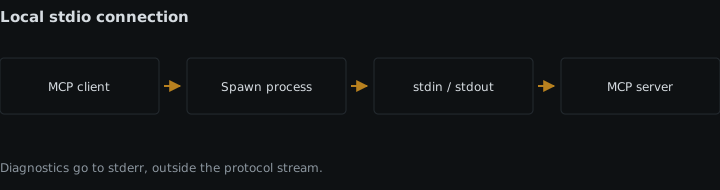
Configure the MCP client to launch the server command, pass credentials through the subprocess environment, and exchange newline-delimited JSON-RPC on stdin and stdout. Keep stdout exclusive to protocol messages; send diagnostics through MCP logging notifications or stderr. A clean initialization exchange proves the stdio transport is wired correctly.
Prerequisites
You need an MCP client that can launch a command and a server entry point that stays running while it reads standard input. The client configuration must let you set the executable, its arguments, and the subprocess environment. If the server calls an external service, have the required credential ready as an environment variable.
The important boundary is the process itself. With stdio, there is no HTTP authorization exchange to complete: the client supplies configuration when it starts the server, then the two processes communicate through standard input and standard output.
Steps
-
Define the command the client will start
Configure the client with the exact executable and arguments required to run the server. In the stdio transport, the client starts the MCP server as a subprocess and exchanges JSON-RPC messages with it over stdin and stdout. The MCP transport specification dated 2025-11-25 defines this process relationship and the stream requirements.
This means the server is not a command that performs one operation and exits. Its entry point must remain alive, read messages from stdin, dispatch them, and write corresponding protocol messages to stdout. The client owns the subprocess lifetime, so test the same command that will appear in the client configuration rather than relying on a separate manual startup path.
Stdio is the fitting choice when the client and server can run on the same machine and the client is allowed to start the server. If the integration must be reached across machines or shared by several clients, compare the process model with remote versus local MCP servers before committing to stdio.
-
Pass credentials through the subprocess environment
Put every credential the server needs in the environment supplied to the subprocess. The server should read those values from its process environment when it starts. Credentials for stdio servers come from that environment rather than the HTTP authorization flow.
This distinction matters because the MCP authorization specification dated 2025-11-25 applies its authorization flow to HTTP-based transports and explicitly directs stdio implementations to retrieve credentials from the environment. Do not wait for an authorization redirect, access-token response, or HTTP challenge that will never occur on this transport.
Keep command selection and secret injection as separate pieces of configuration. That gives the server one predictable startup contract: executable and arguments determine what runs; environment variables determine which protected services it can use. If a required variable is absent, report that failure outside stdout so the client does not mistake the diagnostic for a protocol message.
-
Read one complete JSON-RPC message at a time
Build the input loop around stdin. For each complete incoming message, parse the JSON object, inspect whether it is a request or notification, and dispatch the named method. Do not treat arbitrary terminal text as input; the stream carries protocol messages.
Follow the JSON-RPC 2.0 specification: a protocol object carries
"jsonrpc": "2.0"; a request has a method and an identifier; a notification has no identifier; and a response returns either a result or an error associated with the request identifier. A notification does not receive a response.Under the MCP stdio transport, messages are newline-delimited and must not contain embedded newlines. Buffer until the delimiter before parsing, then process exactly that message. This preserves the message boundary even though stdin itself is a byte stream. If parsing fails, handle the failure as a protocol error when a valid response can be formed; do not print a prose explanation to stdout.
-
Write only framed protocol messages to stdout
Serialize each JSON-RPC response or server notification as a single message, append the required newline delimiter, write it to stdout, and make the write available to the client promptly. Return the same request identifier in the response so the client can match concurrent work correctly.
Reserve stdout exclusively for MCP protocol traffic. A startup banner, debug print, stack trace, progress message, or library log on stdout becomes indistinguishable from the JSON-RPC stream. That diagnostic text corrupts framing: the client may attempt to parse it as a protocol message or combine it with a legitimate message.
Audit the whole process, not only the transport function. Logging frameworks, imported libraries, development-mode banners, and unhandled-error handlers can all write to stdout without passing through your response code. Start the server under the same command and environment the client uses, then inspect stdout from process start through shutdown. Every emitted line must be a valid protocol message.
-
Route diagnostics away from the protocol stream
Send process-level diagnostics to stderr. This includes startup failures, missing environment variables, stack traces, and temporary debugging output. The client may capture, display, or ignore stderr without confusing it with the protocol stream.
Once the protocol session supports it, use structured MCP logging notifications for diagnostics that should be visible as MCP events. These notifications still travel as valid JSON-RPC messages on stdout; they are not free-form log lines. Keep stderr for process diagnostics and protocol logging notifications for structured information intended for the client.
Test this separation deliberately. Trigger one known startup failure and confirm that its explanation appears on stderr while stdout remains empty or contains only valid JSON-RPC. Then trigger one normal request and confirm that its response appears on stdout without a banner or debug prefix.
-
Register the server in the MCP client
Add the command, arguments, and environment mapping to the client’s server configuration. The exact configuration syntax belongs to the client, but the resulting process boundary must be the same: the client launches one subprocess, writes JSON-RPC to its stdin, reads JSON-RPC from its stdout, and treats stderr separately.
Avoid a wrapper that changes those stream roles. If a launcher prints status text to stdout before starting the real server, the transport is already corrupted. A wrapper is acceptable only when it preserves stdin for client-to-server messages, stdout for server-to-client protocol messages, stderr for diagnostics, and the required environment for credentials.
Restart the client after changing launch configuration so the next test uses a newly created subprocess and the intended environment. If the processes disagree after startup, check capability negotiation between the MCP client and server separately from transport framing; a correctly framed response can still describe an unsupported capability.
-
Verify the complete exchange at the process boundary
Start the server through the client, not from a separate terminal. Confirm that the subprocess stays alive, accepts the client’s first JSON-RPC request through stdin, and returns a valid JSON-RPC response through stdout. Check that the response identifier matches the request and that every stdout message is a single newline-delimited JSON object.
Next, invoke one server operation that requires credentials. Success shows that the client passed the credential through the subprocess environment and that the server read it there. An authorization failure with otherwise valid JSON-RPC points to environment configuration rather than an HTTP authorization step.
Finally, cause a controlled diagnostic condition. The message must appear on stderr or as a structured MCP logging notification, never as unframed text on stdout. If the client reports a parse failure, inspect the raw stdout stream before debugging the tool implementation; diagnosing a failing MCP tool call starts with separating transport corruption from an application-level error.
Expected result
The MCP client starts one server subprocess with the required credentials in its environment. The client sends newline-delimited JSON-RPC through the server’s stdin, and the server returns only newline-delimited JSON-RPC through stdout. Diagnostics use stderr or structured logging notifications. A normal request receives a matching response without framing or authorization-flow errors.
Sources
- MCP transport specification dated 2025-11-25modelcontextprotocol.io
- MCP authorization specification dated 2025-11-25modelcontextprotocol.io
- JSON-RPC 2.0 specificationjsonrpc.org
See also
Cloudinary's remote MCP servers use stateless Streamable HTTP at /mcp; /sse is deprecated except for Analysis, and still accepts POST as an alias.
Open subscriptions/listen, filter for supported changes, recover from stream closure, and refresh affected caches in MCP revision 2026-07-28.
How MCP tasks wrap long-running requests in durable state, expose polling metadata, and return results later through `tasks/result`.
Configure OAuth resource indicators, audience validation, and separate upstream credentials so an MCP server rejects misbound tokens and avoids passthrough.