Define structured output schemas for MCP tools
- Author
 Joseph TrasattiMember of technical staff
- Published
- Section
- MCP
- Length
- 10 min read3 sources cited
Declare an MCP tool’s outputSchema as the machine-readable contract, return a matching structuredContent object alongside useful human-readable content, and validate the object on both server and client. Treat field removals, renames, type changes, and newly required fields as compatibility breaks even when the accompanying text still makes sense.
Prerequisites
Before changing the tool, collect its current tools/list definition, representative tools/call results, and the fields existing consumers read. If the tool already returns structuredContent, treat that shape as a published contract even if it has no declared schema. Adding a schema that rejects existing results is a breaking change disguised as documentation.
Use separate fixtures for successful results and tool failures. An output schema describes successful structured data; it does not replace the tool’s error behavior or its inputSchema.
Steps
-
Decide whether the result needs a machine-readable contract
An MCP tool may declare
outputSchemaso clients can validatestructuredContentwithout parsing prose. According to the MCP tools specification dated 2025-11-25,outputSchemais optional, structured content is a JSON object, servers must make structured results conform to a declared schema, and clients should validate them.Add the schema when another program needs to select fields, branch on a status, store the result, or pass it into another operation. A deployment tool whose caller needs
deploymentIdandstatebenefits from a contract. A tool whose only useful result is an explanation for a person may not: imposing a structure then creates fields that must be maintained without giving a consumer anything dependable.Do not confuse this with schema-constrained model generation. MCP
structuredContentis data produced by the server after a tool call. The output schema tells a client how to check that data; it does not cause a model to generate the object correctly.The cost is contract ownership. Once a client relies on a field, changing its name, type, allowed values, or presence requires compatibility work. If nobody consumes individual fields, keep the result human-readable until a real structured use appears.
-
Design the smallest stable result object
Start with what consumers must know, not every value returned by the upstream service. The MCP schema reference for 2025-11-25 defines
outputSchemaas a JSON Schema object for thestructuredContentfield, restricts its root totype: "object", and defaults to JSON Schema 2020-12 when$schemais omitted.Suppose
search_deploymentsmust let a caller identify deployments and branch on their state. A narrow schema is:{ "type": "object", "properties": { "deployments": { "type": "array", "items": { "type": "object", "properties": { "deploymentId": { "type": "string" }, "state": { "type": "string", "enum": ["queued", "running", "succeeded", "failed"] } }, "required": ["deploymentId", "state"] } } }, "required": ["deployments"] }The mechanism is direct:
typeconstrains the JSON value type,enumlimits accepted values, andrequirednames properties that must exist. The JSON Schema 2020-12 validation vocabulary, published 16 June 2022, defines those validation rules. Arequiredentry is not documentation; an object missing that property fails validation.Make a field required only when every successful result can provide it and a consumer cannot sensibly proceed without it. Keep conditional or upstream-specific details optional. Otherwise, one partial upstream response can force the server either to violate its schema or invent a value. Do not use an empty string, zero, or a made-up enum member to satisfy validation unless that value has the declared meaning.
An enum is appropriate when the set controls client behavior and the server can map every successful result into it. It is the wrong answer for an open-ended label copied from another system: a new upstream value would make an otherwise usable result invalid. In that case, return a string and let the consuming operation decide which values it understands.
-
Attach
outputSchemato the tool definitionPut the schema beside
inputSchemain the tool object returned bytools/list:{ "name": "search_deployments", "description": "Find deployments by project", "inputSchema": { "type": "object", "properties": { "projectId": { "type": "string" } }, "required": ["projectId"] }, "outputSchema": { "type": "object", "properties": { "deployments": { "type": "array", "items": { "type": "object", "properties": { "deploymentId": { "type": "string" }, "state": { "type": "string", "enum": ["queued", "running", "succeeded", "failed"] } }, "required": ["deploymentId", "state"] } } }, "required": ["deployments"] } }The two schemas face opposite directions.
inputSchemaconstrains arguments sent to the server;outputSchemaconstrains structured results returned by it. Keep their validators and fixtures separate. The same distinction matters when defining and validating MCP prompt arguments: an argument contract cannot substitute for checking tool results.Omitting
$schemaselects the MCP default, JSON Schema 2020-12. Declare another draft only when the validator on every supported path understands it. Choosing a draft merely because one library defaults to it moves that library’s constraint into every client integration. -
Return human-readable content and matching structured content
The tool can return both human-readable
contentandstructuredContent, but the structured object should conform to the declared schema. A successful response can look like this:{ "content": [ { "type": "text", "text": "Found 2 deployments: dep_123 succeeded; dep_124 is running." }, { "type": "text", "text": "{\"deployments\":[{\"deploymentId\":\"dep_123\",\"state\":\"succeeded\"},{\"deploymentId\":\"dep_124\",\"state\":\"running\"}]}" } ], "structuredContent": { "deployments": [ { "deploymentId": "dep_123", "state": "succeeded" }, { "deploymentId": "dep_124", "state": "running" } ] }, "isError": false }The first text block is for a person or assistant displaying the outcome. The second follows the specification’s backward-compatibility recommendation to include serialized JSON in a text block when returning structured content. The object is for clients that understand
structuredContent.Produce all three representations from one normalized result object. If separate code paths build the summary, serialized JSON, and structured object, they can disagree even though each is individually well formed. Serialization has a small response-size cost, but it preserves a usable representation for clients that do not consume
structuredContent.Human-readable text does not have to preserve the object’s layout, but it must not contradict it. If the object says
runningwhile the summary saysfailed, JSON Schema validation will not catch the disagreement: the schema validates structure and declared values, not whether two representations describe the same event. -
Validate on the server before returning the result
Run the same output schema against the final normalized object immediately before constructing the tool result:
const normalized = {
  deployments: upstreamRows.map(toDeploymentResult)
};

const validation = validate(outputSchema, normalized);

if (!validation.valid) {
  throw new Error(formatValidationErrors(validation.errors));
}

return {
  content: buildContent(normalized),
  structuredContent: normalized,
  isError: false
};
Here,
validateandformatValidationErrorsstand for the validator and diagnostic formatting already used by the server; they are not MCP methods. The important boundary is that validation runs after upstream data has been normalized and before the result leaves the server.Validate the object you actually return, not an earlier intermediate value. A later serializer, mapper, or field filter can remove a required property after an earlier check has passed. Keep the schema as one shared object used by the tool declaration, runtime validation, and tests. Three handwritten copies will eventually describe three contracts.
Server-side validation finds mapping mistakes before clients receive them. Its cost is runtime work and an additional failure path. That cost is justified when callers automate against the object. It may be unnecessary for an unstructured-only tool, where there is no output contract to enforce.
-
Validate
structuredContentagain in the clientA consuming client should retain the
outputSchemadiscovered throughtools/listand apply it to thestructuredContentreturned bytools/callbefore reading any fields:const tool = listedTools.find(t => t.name === "search_deployments"); const result = await callTool(tool.name, { projectId }); if (result.structuredContent === undefined) { return contractFailure("Missing structuredContent"); } const checked = validate(tool.outputSchema, result.structuredContent); if (!checked.valid) { return contractFailure(formatValidationErrors(checked.errors)); } useDeployments(result.structuredContent.deployments);Client validation protects the operation from a server version with a bad mapper, an outdated schema, or a result that passed through a path without server validation. MCP says clients should validate rather than requiring every client to do so, so test the MCP client differences between an IDE and a desktop assistant that matter to the deployment instead of assuming identical behavior.
For an interactive display, showing the text alongside a validation warning may still be useful. For automation, do not silently parse the prose as a fallback. That recreates the ambiguity the output schema was introduced to remove: punctuation or wording can change while remaining understandable to a person.
Keep contract validation distinct from distinguishing JSON-RPC protocol errors from MCP tool failures. A syntactically successful JSON-RPC response can still contain
structuredContentthat violates the tool’s contract. Transport success therefore does not prove that the result is safe for field-level consumption. -
Classify schema changes before publishing them
A schema change can break clients even when the text response remains understandable. Review each change against both the previous schema and the code that consumes it:
Change Compatibility condition Breaking condition Add an optional property Old clients ignore unknown properties and their validation permits them A client rejects or cannot deserialize unknown properties Add a required property All producers already return it and all coordinated clients accept it Old fixtures or server versions omit it Remove or rename a property No supported client reads it A client validates or branches on the old name Change a property type Every supported client accepts both representations A client expects the previous type Add an enum value Clients handle unknown values explicitly A client assumes the listed cases are exhaustive Remove an enum value No supported producer or stored fixture emits it An older server can still return it Human-readable text hides many of these breaks. “Deployment dep_123 succeeded” remains clear whether the object uses
deploymentId,deployment_id, orid; a client looking updeploymentIddoes not.Keep the existing tool name and extend its schema only when the compatibility conditions are true for supported consumers. For an incompatible result, either coordinate the server and every client as one release or publish a separately named tool contract, such as
search_deployments_v2, while the previous one remains available during migration.A second tool avoids changing the contract beneath unknown consumers, but it adds another definition to the tool catalog and another implementation to test. That trade-off matters when considering the context cost of leaving several MCP servers and their tools enabled. Do not create a new tool version for a harmless description edit; do not reuse the old contract for a field rename merely to keep the catalog smaller.
-
Test the producer, consumer, and upgrade paths
Keep at least one valid fixture for an empty result and one for a populated result. Add invalid fixtures for each rule the client depends on: a missing required field, a wrong type, and an unrecognised enum value when the schema has an enum. Assert that the server rejects invalid normalized output and that the client refuses to consume invalid
structuredContent.Then test compatibility in both directions. Validate new server results against the old schema to find breaks for clients that have cached or generated against it. Validate old successful fixtures against the new schema to find newly required fields or tightened rules. A test that only validates the newest fixture with the newest schema proves internal consistency, not upgrade safety.
Check the text and structured forms from the same fixture as well. Assert the exact fields clients use, while testing summaries for the facts they communicate rather than incidental punctuation. This catches the case where the structured object passes its schema but the displayed result tells the user something different.
Finally, call the tool through each supported client path. Confirm that the client discovers
outputSchema, receivesstructuredContent, reports an invalid object rather than consuming it, and can still display the human-readable content where that behavior is intended.
Expected result
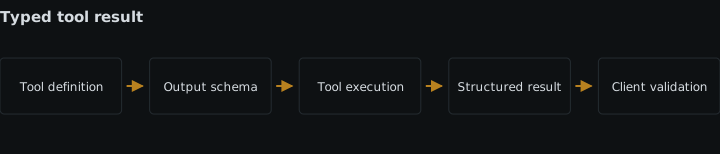
The tool advertises an object-rooted outputSchema, returns a conforming structuredContent object and useful text from the same normalized data, and validates the object before consumers use it. Tests reject missing, mistyped, and unsupported values and expose incompatible schema revisions even when the text response remains readable.
Sources
- MCP tools specification dated 2025-11-25modelcontextprotocol.io
- MCP schema reference for 2025-11-25modelcontextprotocol.io
- JSON Schema 2020-12 validation vocabulary, published 16 June 2022json-schema.org
See also
Why a listing call over a large Cloudinary library can silently truncate inside an MCP client, how to confirm it, and how to ask for less instead.
What the machine-readable transformation rules file is, how MCP transformation tools use it, and what it does and does not tell you about a URL.
Step-by-step setup for Cloudinary's MediaFlows MCP server: the /v2/mcp endpoint, its three custom auth headers, and why its config differs from the others.
Troubleshoot MCP 2026-07-28 migrations across discovery, request metadata, MRTR, subscriptions, deprecations, and legacy fallback.