Server-provided prompt templates in MCP
- Author
 Joseph TrasattiMember of technical staff
- Published
- Section
- MCP
- Length
- 5 min read3 sources cited
MCP servers can expose prompts as user-invoked templates. A client discovers them with `prompts/list`, retrieves one by name with `prompts/get`, and supplies any declared arguments. The server returns role-tagged messages that the client can present to the user or send to a model; prompts neither execute tools nor choose resources.
What server-provided prompts are
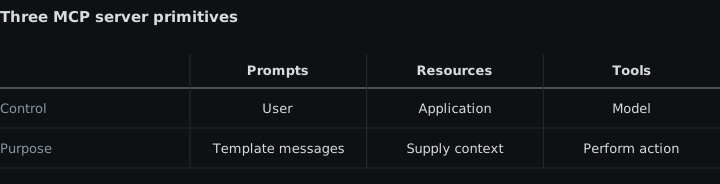
Server-provided prompts are reusable message templates that an MCP server exposes to clients. Under the 25 November 2025 prompts specification, they package instructions and structured content for a user to invoke, optionally with arguments, without hard-coding the finished messages into each client.
The server owns the template and expands it. The client owns discovery, argument collection, presentation, and the decision to send the returned messages to a model. Retrieving a prompt does not itself run a model or perform an external action.
Prompts are user-controlled
Prompts are intended for explicit user selection. A client might expose them as slash commands, command-palette entries, buttons, or another interface, but MCP does not require a particular presentation. The important condition is that choosing a prompt is a user-controlled operation rather than an automatic tool decision.
That control model separates prompts from the other main features exposed by a server. Tools define actions that a model can select and request, subject to whatever approval controls the client applies. Resources expose information that an application can select and pass into context. Prompts provide prepared messages that the user chooses to invoke. The MCP server-concepts guide, accessed 26 August 2026, describes these as model-controlled tools, application-driven resources, and user-controlled prompts.
The distinction determines what belongs in each feature. An operation that changes external state belongs behind a tool, not inside a prompt template. Server-held information belongs in a resource, even when a prompt embeds or refers to that information. A repeatable way to frame a model interaction belongs in a prompt when the user should deliberately select it.
A client connecting to an unfamiliar server should therefore display prompts separately from actions and context. Someone looking for available documents needs the server’s resources, covered in discovering and reading MCP resources. Someone deciding what operations a model may call needs the tool controls described in restricting exposed MCP tools.
What a server advertises
A server that supports prompts declares a prompts capability during initialization. It can also declare listChanged, indicating that it will notify the client when its available prompt list changes.
Each advertised prompt has a required name, which is its protocol identifier. It may also have a human-readable title, a description, display icons, and an arguments list. Each declared argument has a name and may include a description and a required flag.
The argument declaration is deliberately narrower than a general tool input schema. It tells the client which named values a template accepts and which ones are required; it is not a JSON Schema for an action. In the prompts/get request, the supplied arguments form an optional string-to-string map. If a prompt needs a repository name, language, or other constrained value, the client may use the protocol’s completion operation as described in argument completion for prompts and resource templates.
Discovery with prompts/list
The client first sends prompts/list to discover the prompts offered by the server:
{
  "jsonrpc": "2.0",
  "id": 1,
  "method": "prompts/list"
}
The result contains a prompts array of descriptors. This gives the client the names it can request, the labels and descriptions it can show, and any declared arguments it should collect. The operation is paginated: a request may include a cursor, and a result may contain nextCursor when another page is available.
Listing before retrieval matters because prompt availability and required inputs belong to the server. A client should not infer prompt names or keep an assumed argument shape indefinitely. If the server advertises changes, notifications/prompts/list_changed tells the client to refresh the list; the notification does not carry a replacement list itself.
Retrieval with prompts/get
After selection, the client requests one prompt by its advertised name with prompts/get. It includes any values required by that prompt’s argument declarations:
{
  "jsonrpc": "2.0",
  "id": 2,
  "method": "prompts/get",
  "params": {
    "name": "code_review",
    "arguments": {
      "code": "function add(a, b) { return a + b; }"
    }
  }
}
The request is not a tool call. The server uses the named template and supplied strings to construct prompt messages, then returns those messages to the client. Missing required arguments and unknown prompt names are invalid parameters; the prompts specification assigns both cases the standard JSON-RPC error code -32602. Servers are expected to validate arguments before processing them.
This two-request surface keeps discovery separate from expansion. prompts/list answers what the user can choose and what input each choice declares. prompts/get answers what messages a particular choice produces for the supplied values. Clients may cache descriptors for presentation, but a changed-list notification is the signal to discover them again.
The result is a message sequence
A successful prompts/get result contains an optional description and a required messages array. The 25 November 2025 MCP schema reference defines every PromptMessage as a role plus one content block. The role is either user or assistant; the prompt-message type does not define a system role.
The content block can carry text, an image, audio, or an embedded resource. Image and audio data are base64-encoded and include a MIME type. An embedded resource includes a resource URI, its MIME type, and either text or base64-encoded binary data. This lets one template return more than a single line of prose: it can establish a short, ordered exchange or place server-managed material into that exchange.
For example, the result shape is:
{
  "jsonrpc": "2.0",
  "id": 2,
  "result": {
    "description": "Prepare a code review request",
    "messages": [
      {
        "role": "user",
        "content": {
          "type": "text",
          "text": "Review the supplied function."
        }
      }
    ]
  }
}
The array order and role tags are part of the returned prompt. The client can present that sequence to the user or send it to a model. MCP does not require the client to submit it automatically, nor does retrieval prescribe a particular model. How prominently prompts appear, whether their expanded content is shown before submission, and which content blocks are supported can differ between clients; those integration differences are covered in MCP clients in an IDE and a desktop assistant.
What to check next
When implementing prompt support, check capability negotiation, paginated discovery, required-argument handling, completion support, changed-list notifications, and rendering for every accepted content block. Keep the boundary visible in the interface and code: prompts prepare user-selected messages, resources supply context, and tools request actions.
Sources
- 25 November 2025 prompts specificationmodelcontextprotocol.io
- MCP server-concepts guide, accessed 26 August 2026modelcontextprotocol.io
- 25 November 2025 MCP schema referencemodelcontextprotocol.io
See also
Trace initialization, verify the HTTP version header, and stop cleanly when client and server share no supported MCP protocol version.
Implement bidirectional MCP cancellation, stop costly work, suppress cancelled responses, and handle completion races without protocol errors.
Negotiate support, reread resources after update notifications, and remove subscription state when interest or the MCP session ends.
How MCP servers advertise URI templates, attach template-level metadata, and turn user or model input into concrete resource reads.