MCP Roots as Filesystem Boundaries
- Author
 Joseph TrasattiMember of technical staff
- Published
- Section
- MCP
- Length
- 6 min read3 sources cited
MCP roots let a client declare which filesystem locations matter to a session. Servers can request that list and, when capability negotiation permits it, receive change notifications. Roots guide server behavior; they do not restrict the server process, so real filesystem boundaries still require operating-system permissions or sandboxing.
MCP roots define session context
MCP roots are filesystem locations that a client declares relevant to its current session with an MCP server. They tell the MCP server where it should operate without granting, revoking, or technically restricting filesystem access.
The MCP roots specification dated 25 November 2025 describes roots as a client feature. A client might derive them from an open workspace, a project picker, version-control metadata, or another interface. The protocol does not prescribe that interface. What crosses the protocol boundary is a list of root records.
This direction matters: the client supplies the context because it knows what the user has opened or selected. The MCP server can ask for that context, then use it to choose which directories or files are relevant. A repository-aware MCP server might receive separate frontend and backend repositories, for example, rather than assuming that every directory visible to its process belongs to the task.
Roots therefore help keep project context separate from server selection. Deciding which MCP servers a project actually needs controls which processes and capabilities enter the session; roots tell a filesystem-aware MCP server which locations matter after it has been selected.
A root is a URI with optional display metadata
The 25 November 2025 MCP schema reference defines each Root with a required uri, an optional human-readable name, and optional _meta data. In this protocol version, the URI must begin with file://. The specification says that restriction may be relaxed in a later version, so an implementation should follow the negotiated protocol version rather than assume that every future root will use the same scheme.
A valid root can identify a directory or an individual file. A client can return more than one root when a session spans several repositories or selected locations. For example:
{
  "roots": [
    {
      "uri": "file:///work/product/frontend",
      "name": "Frontend"
    },
    {
      "uri": "file:///work/product/backend",
      "name": "Backend"
    }
  ]
}
The name helps a client or MCP server display the location intelligibly. It does not replace the URI as the location identifier. The operative boundary remains the URI supplied in the root list.
The MCP server requests the current list
A client declares root support during initialization by including a roots member in ClientCapabilities. An MCP server that needs the current locations sends a JSON-RPC roots/list request. The client responds with ListRootsResult, whose roots field is an array of Root objects.
The request contains no path filter. It asks for the client’s current root list as a whole:
{
  "jsonrpc": "2.0",
  "id": 1,
  "method": "roots/list"
}
The MCP server should check the negotiated capability before sending that request. The roots specification assigns JSON-RPC error -32601, Method not found, to the case where a client does not support roots, and -32603 to an internal client error. A missing roots capability is therefore different from a supported client returning a particular set of locations.
The list is session context, not a permanent server configuration. A different workspace or project selection can produce a different list, even when the same MCP server executable is used. An MCP server that caches roots must consequently be prepared to replace that cache when the client reports a change.
Roots do not enforce filesystem access
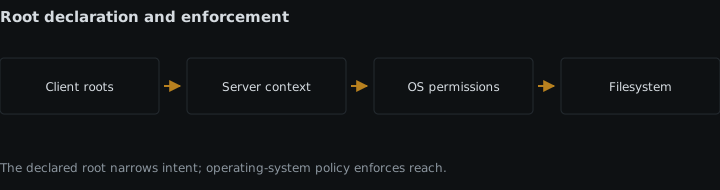
A root is not an access-control mechanism. It states where the MCP server is expected to operate, but it does not alter the permissions of the MCP server process. If that process can read a parent directory, a home directory, or another mounted volume under its operating-system identity, sending a narrower root list does not remove that ability.
The distinction is between a declared application boundary and an enforced security boundary. A well-behaved MCP server validates requested paths against the declared roots and refuses work outside them. A defective or malicious process can ignore that convention unless something outside the protocol prevents it.
The MCP project’s security best practices for local MCP servers, dated 25 November 2025 warn that local servers run with the client’s privileges unless further restrictions are applied. The guidance calls for minimal default privileges, restricted filesystem and network access, explicit grants for additional privileges, and platform-appropriate sandboxing such as containers, chroot, or application sandboxes.
Operating-system enforcement must therefore accompany roots when crossing the declared boundary would be harmful. That can mean launching the MCP server under an identity with limited filesystem permissions or placing it in a sandbox that exposes only approved directories. Roots still have value inside that environment: they tell the process which of its accessible locations belong to the current task. The sandbox or operating system handles the separate question of what the process can reach at all.
This separation also affects consent. A workspace picker can communicate what the user intends to share, but the process permissions determine the consequence if the MCP server disregards that selection. Showing a narrow root in an interface while launching the server with broad host permissions provides context without equivalent technical containment.
Root changes are capability-gated
Clients can notify MCP servers when the root list changes if both sides advertised compatible capability support during initialization. The client-side declaration is roots: { "listChanged": true }. The listChanged field says that the client will emit notifications when it adds, removes, or modifies a root.
For precision, the 25 November 2025 schema does not define a matching roots field in ServerCapabilities. The roots declaration lives in ClientCapabilities; compatible MCP server behavior consists of using the advertised feature and handling its messages. Capability negotiation is bilateral at the session level, but the roots flag itself is client-declared. An implementation should inspect the actual negotiated fields rather than assume two identical flags exist.
When the list changes, the client sends notifications/roots/list_changed:
{
  "jsonrpc": "2.0",
  "method": "notifications/roots/list_changed"
}
The notification does not carry the revised roots. It tells the MCP server that its previous view is stale. The MCP server then sends another roots/list request and replaces its stored list with the response. If listChanged was not advertised, the MCP server cannot rely on receiving this signal and should not treat an earlier list as dynamically maintained.
A root-list notification is also distinct from a subscription to the contents of an MCP resource. Roots report which filesystem locations are in scope; MCP resource subscriptions report updates to resources exposed by an MCP server. Changing a file inside an unchanged root does not, by itself, mean that the root list changed.
Both clients and MCP servers validate the boundary
The client is responsible for exposing appropriate roots, validating their URIs, preventing path-traversal constructions, checking accessibility, and giving the user a way to manage the list. The MCP server is responsible for validating operation paths against the returned roots, respecting those boundaries, and handling a root that becomes unavailable.
Those checks preserve the meaning of the declared context. They still do not replace operating-system controls: path validation is behavior implemented by the MCP server, while permissions and sandboxing constrain the process even when its behavior is wrong.
The next implementation detail to check is MCP capability negotiation, because roots and change notifications are available only through the initialized session’s declared capabilities. Also verify how the chosen client exposes workspaces and consent: IDE and desktop-assistant MCP clients differ in the configuration and user interaction they can provide.
Sources
- MCP roots specification dated 25 November 2025modelcontextprotocol.io
- 25 November 2025 MCP schema referencemodelcontextprotocol.io
- security best practices for local MCP servers, dated 25 November 2025modelcontextprotocol.io
See also
How MCP servers request model completions through clients while clients retain control of credentials, models, context, permissions, and approval.
Negotiate sampling tool support, choose a tool mode, execute calls on the server, and return matched results without moving control to the model.
How a remote MCP server changes underneath a client, why versioned paths and deprecated transports matter, and how to assert the tool surface at session start.
Use server/discover, ttlMs, cacheScope, and change notifications to cache MCP 2026-07-28 results without leaking private data.