Set up time-limited media access in no-code
- Author
 Joseph TrasattiMember of technical staff
- Published
- Section
- No-Code
- Length
- 7 min read2 sources cited
Give the asset a token baseline, add an anonymous rule with explicit start and end times for the public window, and generate signed URLs when access must also follow time, IP, or path limits. Use synchronized clocks and cache rules that cannot outlive the window, then test both boundaries through every delivery layer.
Prerequisites
Before changing the workflow, confirm that it can update an asset’s access-control settings. If it cannot do that through a native block, it needs an authenticated HTTP step that performs the equivalent update.
You also need:
- A stable asset identifier. If uploads can overwrite, rename, or duplicate identifiers, fix asset naming in the no-code workflow before adding access rules.
- Authoritative start and end timestamps expressed in one time standard. Do not pass local display times between blocks and assume every service will interpret them identically.
- A way to inspect response headers through the actual delivery route, including any CDN, proxy, or embedded no-code application.
- Account support for token-based access if the rule must bind access to a client IP or delivery path. A public window alone does not require each visitor to present a token.
Steps
-
Choose the rule from the access condition
Use a public access window when everyone who has the URL may fetch the asset between the configured start and end times. This suits an embargoed release or temporary campaign asset because the time boundary is shared by every visitor. It is the wrong answer when access depends on who is requesting the file.
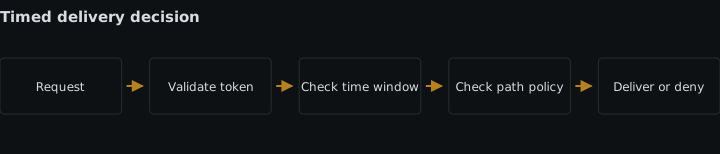
Use token-based access when a request must also satisfy a time limit, client IP, or delivery-path rule. The token is signed and presented with the delivery request, so the delivery layer can check those restrictions instead of trusting a hidden or hard-to-guess URL.
Cloudinary’s media access methods documentation, checked 2026-08-18, says token-based access can restrict time, IP address, or an allowed URL pattern and requires an account that supports the feature. If that support is absent, do not design a token branch and assume it will degrade to ordinary private delivery. Use the public-window mechanism only where its everyone-during-the-window condition is acceptable. For the broader distinction between delivery types, see private versus authenticated media assets.
-
Create one authoritative access record
Store the asset identifier, opening time, closing time, time zone or UTC representation, and selected access mode in one workflow record. Every later block should read these values rather than recalculate them independently.
Validate that both boundaries exist and that the end follows the start before changing the asset. A missing or reversed boundary should stop the run. Silently substituting the current time can either expose the asset early or leave no usable window.
Decide which clock governs the transition. The automation runner, token signer, media service, and client can disagree near a boundary. Measure that skew in the real route and either correct the clocks or define an explicit allowance. Do not invent a generic allowance: widening the interval reduces boundary failures but also widens access. If the closing time is strict, a grace period after it is the wrong trade.
-
Apply the public access window to the asset
Configure the asset as access-controlled, then add an anonymous rule containing the chosen start and end timestamps. Cloudinary’s media access-control rules, checked 2026-08-18, define this combination as public access between those boundaries. During that interval, the ordinary delivery URL works without a token. Outside it, the asset remains restricted unless another valid access rule, such as a token, permits the request.
In a visual workflow, keep the access-control update in the same branch as the validated timestamps. Do not place it in a later branch that might receive a different copy of the record. If the flow is event-driven, choose the appropriate automation trigger type and make the update idempotent so a retry reapplies the same boundaries rather than deriving new ones.
The cost of a public window is coarse authorization: anybody with the URL receives the same access during the interval. Do not use it for per-customer downloads, changing membership, or a requirement to confine delivery to one route.
-
Add signed tokens only when another restriction is required
For the token branch, give the signing step the permitted start or expiration, and add an IP or path condition only when the use case actually depends on it. A path rule should name the delivery path the client will request, including any path component introduced by the approved delivery variant. An IP rule is a poor fit for clients whose visible address can change between receiving and fetching the URL.
Keep the signing key in the no-code platform’s secret store and perform signing in a trusted server-side block or service. A browser-visible formula or client-side step would expose the material used to mint more tokens. If the no-code product has no suitable secret handling or signing operation, the token design needs a small trusted signing service; the public-window feature is not a substitute for per-request authorization.
Set token validity from the authoritative access record. Do not let a convenient default duration extend beyond the intended closing boundary. This adds a signing operation to the delivery path and makes URL generation dependent on a working trusted service, but it buys restrictions that an anonymous window cannot express.
-
Return the correct kind of URL
In the public-window branch, return the normal delivery URL only after the access-control update succeeds. The URL itself does not need to change at opening or closing time; the configured rule determines whether delivery is permitted.
In the token branch, generate the signed URL when the workflow receives an authorized request. Bind the token to the required time, IP, or path conditions, then return that result. Do not mix an unrestricted URL into the same success payload, because consumers may select it instead of the protected one.
Treat a successful access-control update and successful URL generation as separate states. If signing fails, the run has not produced usable token-based access even though the asset is correctly restricted.
-
Keep caches inside the access boundary
Asset access and response caching are separate decisions. An intermediary can store a successful response while the URL is valid and reuse it according to that response’s cache policy. The URL can therefore appear to work after the intended closing time even though a new request reaching the access-control layer would be rejected.
RFC 9111’s HTTP caching rules, published June 2022, define a response as fresh until its age exceeds its freshness lifetime. They also specify that
no-storeprevents a conforming cache from storing the response, whilemust-revalidateprevents reuse of a stale response without successful validation.Inspect the headers produced by the real delivery route. Where the stack exposes cache controls, ensure the freshness lifetime cannot outlast the remaining public or token window. For media that must not be retained by caches, use an appropriate no-store policy. Where caching is useful, require revalidation once the allowed freshness ends. Check the
Age,Date,Cache-Control, and expiry information observed after every intermediary, not only the origin response.If the no-code stack cannot control or verify these headers, record that as a release blocker for a strict cutoff. Asset timestamps alone do not demonstrate that an already stored response will disappear from every intermediary or application history.
-
Test every boundary through the delivery route
Test the public URL before the start, inside the window, and after the end. The first and last requests must be denied when no other valid rule applies; the middle request must succeed. Repeat the post-window request with a fresh client and through a route that previously cached the successful response.
For token access, test a valid token and then vary each configured condition separately: expired time, different client IP, and nonmatching delivery path. Only test conditions the workflow actually uses. Record the request time reported by the automation, the time seen at delivery, the status, and relevant cache headers. A boundary result without those clocks cannot distinguish an access-rule defect from skew.
Finally, exercise workflow retries. The same input must preserve the original start and end times. A retry that replaces them with its own current time silently moves the access window.
Expected result
The asset is publicly retrievable only between its configured start and end times. Where supported and selected, a signed token additionally limits access by time, client IP, or delivery path. Requests outside the allowed conditions are rejected at the delivery layer, and tested cache behavior does not extend the observable access window beyond the policy.
Sources
- media access methods documentationcloudinary.com
- RFC 9111’s HTTP caching rulesrfc-editor.org
See also
How to set up a MediaFlows PowerFlow that deletes rejected user uploads after a grace period, covers derived copies, and logs every deletion for later evidence.
A hosted visual automation and a hand-written webhook handler weighed on setup cost, ongoing maintenance, who is allowed to edit, and version control.
Build a no-code webhook gate that preserves the raw body, rejects stale signatures, records event IDs, and prevents duplicate downstream actions.
How to check the signature and timestamp on a Cloudinary notification before any block in a media automation reads the payload, and why the order matters.