Set Stable Asset Names in No-Code Workflows
- Author
 Joseph TrasattiMember of technical staff
- Published
- Section
- No-Code
- Length
- 7 min read3 sources cited
Use the external business key as the reconciliation anchor, keep editor-facing display names separate, and choose one collision rule. Configure public identifiers, suffixing, overwrite behavior, and folder placement as a single upload-preset policy. If identifiers are random, persist the returned identifier beside the external record instead of trying to reconstruct it later.
Prerequisites
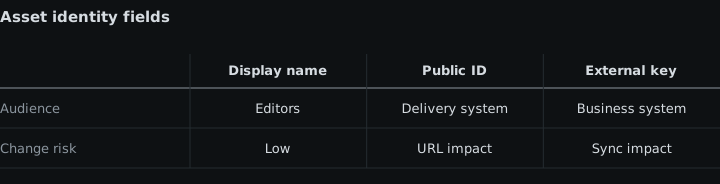
Before changing a workflow, identify its product environment’s folder mode, the external catalog’s stable business key, and every upload preset or connector that can create assets.
Folder mode matters because it changes what a folder means. The Cloudinary folder-mode documentation, accessed August 26, 2026, says that dynamic folders separate Media Library placement from the public ID by default. In fixed folder mode, the folder path is part of the public ID. Confirm the mode before designing identifiers or moving existing assets.
Write down the external field that identifies one logical asset: a product identifier, content record identifier, or another key already controlled by the source system. If no stable key exists, the workflow will need to store Cloudinary’s returned public ID instead of reconstructing it.
Steps
-
Separate the editor’s label from the integration identifier.
Treat the display name as a label for people and the public ID as an integration value. A display name can change for editors while a public identifier may appear in delivery URLs and integrations. Cloudinary’s upload-parameter documentation, accessed August 26, 2026, states that changing a display name does not affect the public ID or delivery URL, while the public ID identifies the resource and is used to build delivery and transformation URLs.
The practical rule is that a display name must never be the only join key between the media library and an external catalog. Editors may correct spelling, add campaign wording, or reuse a familiar label. None of those actions should change which external record owns the asset.
Choose one of two reconciliation anchors:
- Use a public ID derived from the stable external business key when that key is suitable for a public identifier.
- Use a stored crosswalk from the external business key to the public ID returned after upload when the identifier is generated.
The first approach is easier to reconstruct but exposes the chosen naming convention wherever the public ID appears. The second keeps identifiers independent of business naming, but every successful upload must write the returned value back to the catalog or another durable mapping store.
-
Define the public-ID rule before configuring the no-code tool.
Write the rule in a form that another engineer can apply without inspecting previous uploads. It should specify whether the workflow supplies a custom
public_id, uses the normalized source filename, or accepts a random identifier.A custom public ID based on the external business key fits a workflow that must locate the asset deterministically from a catalog record. Using the source filename without a suffix fits only when that filename is itself controlled, stable, and unique within the relevant public-ID path. A random public ID fits ingestion where the source has no usable key and the workflow can persist Cloudinary’s response.
Do not derive identity from an editor-controlled filename unless changing that filename is prohibited upstream. Otherwise, a routine rename becomes a new identifier, and reconciliation cannot tell whether it found a revision or a different asset.
-
Choose collision behavior and reconciliation behavior together.
Random unique suffixes prevent collisions but make deterministic reconciliation from an external catalog harder. With
use_filename=trueandunique_filename=true, Cloudinary normalizes the filename and appends random characters. That is appropriate when separate uploads may legitimately arrive with the same filename and each must survive as a distinct asset.The cost is a required write-back step: the external record cannot derive the completed public ID from its filename alone. If the connector cannot capture the upload response and persist that mapping, random suffixes are the wrong answer for catalog-driven reconciliation.
Set
unique_filename=falseonly when the workflow has another uniqueness guarantee, normally the stable external business key or a controlled filename. This makes lookup deterministic, but two inputs that resolve to the same public ID now require an explicit overwrite decision. Turning off suffixes without defining that decision merely moves the collision from naming into runtime behavior. -
Decide whether the same business key means update or error.
For each workflow, state what a second upload carrying the same external business key means:
- If it is a new revision of the same logical asset, reuse the deterministic public ID and permit overwrite for that route.
- If it represents a separate asset, reject the duplicate key or generate a distinct identifier; do not silently replace the existing file.
- If a person must decide, stop the automation for review instead of letting the connector choose from its defaults.
Cloudinary replaces an existing asset when
overwrite=trueand the incoming upload resolves to the same public ID. That makes overwrite part of the identity contract, not a cleanup option. The downside of permitting it broadly is that a malformed or reused business key can target an existing asset. The downside of forbidding it broadly is that legitimate revisions need a separate replacement route.If several flow runs can submit the same key together, specify which route may perform the replacement and apply the site’s guidance on concurrency controls for no-code flows before enabling overwrite.
-
Choose folder placement without confusing it with identity.
In dynamic folder mode, set
asset_folderfor editor navigation and permissions, not as the only source of identity. The asset folder can change without changing the public ID or delivery URL. A separate public-ID prefix can be configured when the delivery path needs one, but it does not have to mirror the current asset folder.In fixed folder mode, folder placement and public-ID path are coupled. Moving an asset changes its public ID and delivery URL, so a later reorganization can affect integrations. Use the detailed folder-mode decision guide before making folders part of a fixed-mode naming policy.
Decide folder placement in the same policy as uniqueness and overwrite. If different teams independently choose these settings, one preset can create deterministic identifiers in one folder while another creates suffixed identifiers elsewhere for the same external records.
-
Encode the complete policy in the upload preset.
Cloudinary’s upload-preset documentation, accessed August 26, 2026, identifies
use_filename,asset_folder, andoverwriteas preset controls for how uploaded assets are named, stored, and replaced. Configure the preset only after the preceding decisions are written down.Naming policy should decide overwrite, uniqueness, folder placement, and external business key together. Record, for each preset:
- which external field supplies or maps to the public ID;
- whether a random unique suffix is enabled;
- whether duplicate identity causes replacement, rejection, or review;
- which asset folder receives the upload;
- where a generated public ID is written back.
Check whether the connector performs signed or unsigned uploads. For signed uploads, direct request parameters generally take precedence over matching preset values. For unsigned uploads, the preset generally takes precedence, although a request can supply
public_idunless the preset disallows it. A preset is therefore not sufficient governance if another layer can override the identity field. Apply the controls in governing no-code upload presets to every preset used by the flow. -
Test the failure cases, then reconcile the catalog.
Run controlled uploads covering five conditions: a new business key, the same key submitted again, two different keys with the same filename, an editor changing only the display name, and an asset changing folders. Verify the resulting public ID, display name, folder, overwrite outcome, and external mapping after each run.
The display-name test passes only if the editor can rename the asset without breaking the catalog join. The duplicate test passes only if it produces the policy’s declared replacement, rejection, or review outcome. The random-suffix test passes only if the returned public ID is stored beside the correct external key.
Finally, compare the external mapping with an asset metadata export rather than assuming that successful flow runs produced a complete crosswalk.
Expected result
The workflow has one documented identity contract per upload route. Editors can change display names without changing catalog ownership; every public ID is either deterministically derived or durably mapped; duplicate keys follow an explicit overwrite rule; and folder placement behaves according to the product environment’s folder mode.
Sources
- Cloudinary folder-mode documentationcloudinary.com
- upload-parameter documentationcloudinary.com
- upload-preset documentationcloudinary.com
See also
How no-code media delivery negotiates image formats, adjusts compression, preserves source assets, and keeps CDN cache variants compatible.
Generate alt text inside a MediaFlows automation, write it back to asset metadata, and keep decorative images out of the flow.
How to build a media automation flow that expires assets on a date you chose, restricts before it deletes, and shows up in the storage bill the day it runs.
How to apply a logo, watermark or brand treatment to every image at delivery, enforce it at upload, and keep the rule where designers can see it.