Govern Upload Presets in No-Code Workflows
- Author
 Joseph TrasattiMember of technical staff
- Published
- Section
- No-Code
- Length
- 7 min read3 sources cited
Treat each upload preset as a versioned contract: define its callers and product environment, centralize repeated upload behavior in it, wire flows to its stable name, test every effect, and migrate callers before deletion. Never repurpose an existing name while integrations may still depend on it.
Prerequisites
Before changing a preset, get access to the Cloudinary product environments and no-code flows in scope. You also need one representative test asset for each accepted media type and access to any notification receiver used by the preset.
Decide who can approve changes and identify whether each caller requires a signed or unsigned preset. That decision changes how the upload is authenticated and which settings the caller may supply; settle it using the conditions in signed versus unsigned upload presets before configuring the remaining behavior.
Govern the presets
-
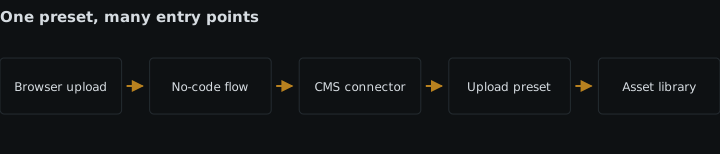
Inventory every caller before touching a preset.
Search the visual flows, upload forms, widgets, API calls, and external no-code integrations that can start an upload. For each reference, record the flow or integration name, its owner, the product environment, and the exact preset name it sends.
Do this even when a preset appears unused. Preset names are operational dependencies: an integration sends the name rather than embedding the preset’s settings. Deleting that preset leaves the caller pointing at something that no longer exists. Repurposing it is more dangerous because the call can continue while applying different naming, transformation, moderation, metadata, or notification behavior.
Cloudinary’s PowerFlow construction documentation, last updated August 18, 2026, describes flows as connected functional blocks whose fields can contain fixed values, environment variables, flow variables, secrets, or values from earlier blocks. Inspect all of those locations rather than searching only visible block labels.
-
Write the contract before creating the preset.
Give each planned preset a short record containing:
- its exact name;
- its purpose and accepted callers;
- the product environment where it exists;
- whether it is signed or unsigned;
- its naming and storage rules;
- its incoming and eager transformations;
- its moderation behavior;
- its metadata and context fields;
- its notification destination;
- its owner and replacement, if one exists.
Teams should document intended callers and environments for every preset because similar presets become indistinguishable in a visual console. A name such as
ugc-image-prodcommunicates more thanupload-2, but the name alone cannot tell an operator which forms and flows depend on it or whether a similarly named preset belongs to another product environment.Keep the record somewhere reviewers can compare with a flow change. The cost is maintaining one small contract per preset. The alternative is reconstructing intent from visually similar console entries during an incident or migration.
-
Put shared upload behavior in the preset.
Configure the preset with the rules every intended caller must share. An upload preset centralizes naming, transformation, moderation, metadata, and notification behavior that would otherwise be repeated in every flow. The mechanism is straightforward: callers provide the preset name, and the preset supplies the stored upload options.
Cloudinary’s upload preset documentation, last updated March 9, 2026, says presets centrally define upload options instead of requiring each upload call to specify them. It documents naming and folders, incoming and eager transformations, moderation, metadata-related upload parameters, and a single Notification URL in a preset’s Advanced settings.
Centralize only behavior that is genuinely common. If two flows need different moderation, naming, or notification outcomes, give them different presets. Forcing both through one preset makes later edits affect unrelated callers. Conversely, duplicating an identical preset per flow creates several contracts that must be kept aligned.
-
Separate environment identity from business purpose.
Create a distinct preset in each product environment where the workflow runs, and record the mapping explicitly. Do not assume that a matching name proves matching configuration. A flow copied from development to production can retain a fixed preset name while the destination product environment contains a different preset—or none at all.
Use an environment-specific variable for the name when the same flow definition is promoted between environments. Use a fixed value when the flow belongs to only one environment and the reduced indirection makes review clearer. In either case, the contract must identify the resolved name, not merely the variable holding it.
-
Create the preset without reusing an existing name.
Add a new preset for a new contract. If an old preset is close but not identical, duplicate its configuration under a new descriptive name and change only the intended fields. Do not turn the old name into the new behavior.
This costs another visible preset during migration, but it keeps existing callers on their previous contract. Reusing a name saves one console row while making the change immediate for every caller that still references it, including callers absent from the current flow canvas.
-
Wire each flow to the documented name.
Set the preset field in the upload block or request-producing block to the exact fixed value or environment variable recorded in the contract. Keep naming, transformations, moderation, shared metadata, and upload notification behavior out of downstream blocks when the preset already owns them.
Cloudinary’s upload documentation, last updated June 14, 2026, confirms that a caller selects a preset through the
upload_presetparameter. It also says signed uploads can put optional parameters in a signed preset, while unsigned uploads depend on an unsigned preset and permit only a restricted set of parameters in the request.Flow-specific metadata may still belong in the flow when it varies per execution. The boundary is the condition: put stable policy in the preset and per-upload values in the caller. Do not copy the same stable policy into both places merely for visibility; duplicate configuration makes ownership unclear.
-
Test the complete contract, not just upload success.
Run the flow with representative assets in a non-production product environment first. Confirm the resulting name and location, inspect the transformed output, check the moderation result, verify the expected metadata, and confirm that the notification receiver sees the event. A successful upload proves only that an asset arrived; it does not prove that every centralized rule ran as intended.
Then inspect the flow execution block by block. Record the tested preset name and product environment with the result so a later reviewer can tell which configuration produced it. Feed those records into operational observability for no-code media flows, and verify the receiving side separately when monitoring webhook delivery is part of the contract.
-
Promote changes by adding, migrating, and retiring.
For a behavior change, create a new preset name, test it, update one caller, and inspect the result before moving the remaining callers. Update the inventory after each migration. Keep the old preset unchanged while any listed caller still uses it.
Delete the old preset only when the inventory shows no remaining caller in any product environment and the owner has approved retirement. If that evidence is unavailable, mark the preset’s status as unverified and leave it in place. Do not rename or repurpose it as a shortcut: integrations that still send the original name can break outright or silently receive the wrong policy.
-
Review the inventory whenever a flow or preset changes.
Make the preset contract part of flow review. A new caller adds a dependency; a copied flow may add a dependency in another product environment; a preset edit changes every recorded caller. Require the change record to name the affected callers, environments, test evidence, and migration or rollback name.
This is the ongoing cost of centralization: one configuration change can have a wide effect. The benefit is that the same review can see that effect in one inventory instead of discovering repeated, slightly different settings across many visual flows.
Expected result
Done means every no-code upload flow resolves to a documented preset in the correct product environment; the preset owns the shared naming, transformation, moderation, metadata, and notification policy; representative uploads prove each part of that contract; and no preset is deleted or repurposed while a recorded integration still references its name.
Sources
See also
Transfer a production no-code flow with its credentials, alerts, limits, recovery runbook, service owner, and tested failure response.
How a media library app integration inside a headless CMS stores references, defers transformation to delivery, scopes folders, and lives or dies on metadata.
Configure no-code HTTP requests with stored secrets, explicit success rules, schema checks, and retries that cannot repeat side effects.
Prevent duplicate API side effects by binding retries to one operation key, retaining outcomes, and treating timeouts as unknown results.