Automate Background Removal in No-Code Workflows
- Author
 Joseph TrasattiMember of technical staff
- Published
- Section
- No-Code
- Length
- 6 min read3 sources cited
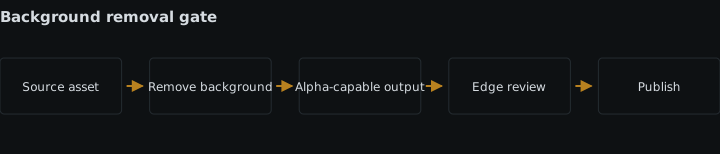
Treat background removal as a queued analysis job, keep the asset pending until completion arrives, deliver the cutout in an alpha-capable format instead of JPEG, and gate automatic publication on a review set covering hair, glass, shadows, and low-contrast products before publishing at scale.
Prerequisites
You need a no-code workflow that can upload or reference an asset, call the media service, receive a completion event, and update a record. Keep service credentials in the platform’s secret store rather than in visible block settings or URLs; the broader pattern is covered in managing secrets inside no-code automation flows.
Create an asset record before processing starts. At minimum, it needs a stable asset identifier, the original asset location, removal status, output location, review status, and error details. The record is what lets separate workflow runs agree on whether an asset is still processing, ready for review, approved, or failed.
Build the workflow
-
Choose whether removal creates a derivative or changes the stored asset.
Decide this before connecting blocks because it determines which file later steps should treat as canonical. Cloudinary’s background-removal documentation, updated 22 July 2026, describes two paths: on-the-fly removal creates a derived version while leaving the original intact; the legacy upload or update path changes the stored original.
Use a derived version when editors may need the untouched upload, when you want to compare results, or when other renditions still depend on the source background. Changing the stored asset is appropriate only when every downstream use expects the cutout and the workflow has another reliable copy of the source. Its cost is loss of an easy in-place rollback: a bad edge can replace the file that reviewers needed for comparison.
Store the original and output as separate fields even if the service initially returns only one usable URL. Do not let a generic “asset URL” field switch meaning halfway through the flow.
-
Submit removal as a job and expose the pending state.
For many asset types, background removal is an asynchronous analysis step and should expose a pending state. The request being accepted does not mean the transparent result exists. Cloudinary’s upload or update flow immediately reports
background_removalaspending; until completion, the asset remains the original image.After the request block succeeds, set the record to
removal_pendingand stop the publication branch. Show that state in the no-code interface so an operator can distinguish expected processing from a stalled or failed run. A flow that passes the request response directly into publication has a race: the publishing block can receive the original asset before removal finishes.Pending is the right answer when the work is still running. It is the wrong answer as a permanent catch-all. Keep explicit error and review states so a rejected request, a missed completion event, and a questionable cutout do not all look like unfinished processing.
-
Resume from completion rather than from a fixed delay.
Configure the removal request to send its completion notification to the workflow’s inbound webhook. Cloudinary reports the updated PNG URL, secure URL, and version in that notification. Use the stable asset identifier to locate the pending record, then write the returned output location and move the record to
review_required.A fixed wait block cannot prove that analysis has finished. If it runs too early, it advances the original asset; if it waits longer than necessary, it adds avoidable delay. A completion event ties the transition to the result that actually exists.
Make repeated completion events harmless: if the same asset and version are already recorded, leave the record unchanged rather than publishing twice. Record unmatched events and failed updates for inspection. If webhook delivery is part of the design, add the checks described in monitoring webhook delivery from no-code media workflows.
-
Set an output contract that preserves alpha.
Transparent output needs a format that preserves alpha; converting the result to JPEG replaces transparency. Cloudinary’s image-transformation documentation, updated 26 June 2026 shows that transformations can deliver an explicitly selected format or choose a transparent format such as WebP or AVIF. For a simple no-code contract, PNG is the least ambiguous choice because the stored background-removal result is already PNG.
The W3C PNG Recommendation published 24 June 2025 defines truecolor and greyscale PNG types with alpha. An alpha sample records opacity: zero is fully transparent, the maximum value is fully opaque, and intermediate values preserve partial transparency at soft edges.
Set the output block to PNG, or to another format only when every downstream consumer is known to preserve alpha. Reject or branch around any later “convert to JPEG” step. If the destination accepts only JPEG, a transparent cutout is the wrong deliverable; composite it onto an intentional background before conversion instead of allowing the destination to choose the replacement background.
-
Gate publication on difficult-edge review.
Edge quality should be reviewed on hair, glass, shadows, and low-contrast products before a flow publishes automatically. These are separate checks, not four names for the same test:
- Hair reveals whether fine strands were removed or merged into a hard outline.
- Glass reveals whether transparent and reflective parts were mistaken for background.
- Shadows reveal whether the cutout keeps, clips, or inconsistently fades visual grounding.
- Low-contrast products reveal whether a foreground edge close to the background colour remains complete.
Build a review set containing each condition that occurs in production. Display the original beside the cutout, and preview the cutout against both light and dark backgrounds; one background can hide a fringe that the other exposes. Give reviewers explicit
approve,reject, andmanual_editoutcomes. Route rejected assets away from publication rather than silently retrying the same operation.Do not invent a universal acceptance score when the supplied evidence gives none. Start with human review for the difficult categories, record the decision with the asset, and allow automatic publication only for input classes your own reviewed set has shown to be acceptable. If assets are user supplied, this review gate can follow automated UGC moderation but should remain a distinct decision: safe content can still have an unusable cutout.
-
Publish only the completed, approved output.
Make publication conditional on all three facts being present: removal is complete, the output format preserves alpha, and review is approved. The publishing block should read the dedicated output field, never the original field or the temporary request response.
Keep the original asset, removal result, completion version, and review decision associated with the same record. That provides a traceable route from published cutout back to its source without making the public branch wait on unrelated assets.
If the builder cannot express separate pending, callback, review, and retry paths clearly—or if repeated events cause duplicate publication—the workflow has crossed the point where a media automation should become code.
Expected result
A completed flow creates a removal job, marks the asset pending, resumes only when the result arrives, stores an alpha-preserving output separately from the original, and sends difficult edges through review. Publication receives the approved transparent asset; pending, failed, rejected, JPEG-converted, and unreviewed results cannot enter the publishing branch.
Sources
See also
Build mutually exclusive MediaFlows branches, normalize metadata before testing it, and route unknown values through an observable final else path.
Build a first MediaFlows automation: pick the trigger, adapt a PowerFlow template, wire block contracts, isolate external calls, ship one asset end to end.
How to run a one-off bulk media migration from a spreadsheet using a published CSV upload flow: validation, metadata, rate limits and resumable rows.
How to export media asset metadata to CSV for review in a spreadsheet, filter it with search expressions, and round-trip edits back without losing the thread.