Monitoring No-Code Workflow Webhooks
- Author
 Joseph TrasattiMember of technical staff
- Published
- Section
- No-Code
- Length
- 7 min read3 sources cited
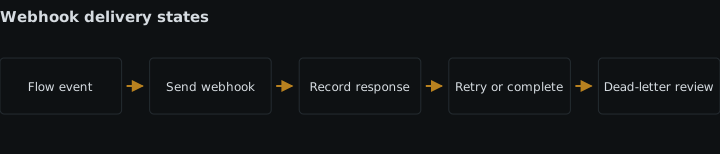
Treat webhook delivery as a separate state from the no-code flow run. Correlate each run with delivery attempts, deduplicate on the event identifier before causing side effects, and record response status, attempt number, latency, and a redacted destination so failures can be diagnosed without leaking credentials.
Symptom: the flow succeeded, but nothing arrived downstream
Likely cause
The flow run and its outbound webhook are separate operations. A successful run proves that the configured blocks completed; it does not prove that the receiver accepted the notification. A timeout, inaccessible endpoint, or rejected request can therefore leave the flow green while the downstream system remains unchanged.
Cloudinary’s MediaFlows flow-building documentation, checked 2026-08-26, reflects that separation: webhook notifications are configured as a channel for successful runs, failed runs, or both. The channel can be enabled independently, and its endpoint and headers have their own configuration. Treating the run result as the delivery result collapses two observable events into one.
This distinction should be part of the broader design for operational observability in no-code media flows, not something added only after the first missed notification.
Check
Choose one completed flow run whose expected downstream effect is absent. Record its run identifier, completion time, configured notification trigger, and destination name. Then inspect the receiver’s ingress logs for the same event identifier and time window.
The result narrows the failure:
- No matching request means the notification was disabled, pointed elsewhere, blocked before ingress, or exhausted its delivery attempts.
- A matching request with a non-success response means the receiver rejected it.
- A matching request with no recorded response means the outcome is uncertain; the receiver may have completed work before the connection failed.
- A matching accepted request with no downstream effect moves the incident beyond delivery and into the receiver’s processing path.
Also open the flow’s notification settings and verify that the webhook channel covers the outcome you are testing. Confirm the endpoint by its redacted identity, not by copying a credential-bearing URL into a ticket or chat. If an active flow’s webhook configuration was removed, the MediaFlows documentation says the flow must be fixed so the webhook can be created again.
Cloudinary’s webhook notification documentation, checked 2026-08-26, says its notification service evaluates the HTTP response and makes three additional attempts after a response other than 200 OK: after 3, 6, and 9 minutes. It also documents a 20-second connection timeout. Those numbers give you concrete intervals to inspect instead of declaring a notification lost immediately after the run finishes.
Fix
Create a delivery record when the flow becomes eligible to notify. Give that record its own state, separate from the run state. A minimal model is:
awaiting_attempt: the run completed, but no attempt is recorded;delivered: the receiver returned the response your sender accepts;failed: an attempt received a rejecting response or transport failure;outcome_unknown: the connection ended without proving whether the receiver acted.
Correlate the record with both the flow run and event identifier. Alert on a successful run that never reaches delivered, using the documented retry schedule as the investigation window. Do not rewrite the flow itself as failed: that would misdescribe what happened and can tempt an operator to rerun completed media work merely to resend a notification.
The cost is one more state transition and correlation key per run. That is justified when the webhook starts publishing, moderation, catalog synchronization, or another downstream action whose absence matters. For a disposable notification with no operational consequence, receiver ingress logs may be sufficient.
Symptom: one flow run causes the downstream action twice
Likely cause
The receiver completed its side effect but failed to return an accepted response, or its response did not reach the sender. A retry then delivered the same event again. From the sender’s perspective, retrying was correct; from the receiver’s perspective, processing both attempts as new work was not.
Webhook receivers therefore need to deduplicate event identifiers. The retry attempt is a new delivery attempt, not a new business event.
GitHub’s webhook best-practices documentation, checked 2026-08-26, provides a useful cross-vendor model: consumers use a delivery identifier to recognize an event, and a requested redelivery retains the original identifier. That is not a claim that Cloudinary sends GitHub’s X-GitHub-Delivery header; use the identifier supplied by the webhook you actually receive.
Check
Group receiver records by event identifier, then count delivery attempts and completed side effects for each group. Investigate any identifier with more than one side effect. For each duplicate, compare the first attempt’s processing result with the response recorded by the sender or receiver.
If the logs cannot answer that query because they omit the event identifier, add the identifier before changing retry behavior. Disabling retries hides the receiver defect and trades duplicate work for permanently missed notifications.
Test the correction in a non-production flow: send one event, allow the receiver to complete its durable write, and make the first response fail. The later delivery should be recorded as another attempt while the durable side effect remains present only once.
Fix
Before causing the side effect, atomically reserve the event identifier in durable storage. A unique constraint or compare-and-set operation should allow only the first handler to acquire it. Store the processing outcome against the same identifier.
On a repeated delivery, return the accepted response without repeating the side effect. If the first handler is still working, route the duplicate through the same in-progress result rather than starting parallel work. Keep the deduplication record for at least the period in which the sender can retry; no longer retention period is asserted by the supplied sources.
Where the receiver cannot finish safely within the sender’s timeout, acknowledge only after placing the event in durable asynchronous work. This adds a queue or equivalent store, an atomic write, and cleanup work. It is the wrong trade when the notification has no side effect and repeated processing is harmless. It is necessary when repetition can publish an asset twice, send two messages, or apply the same state change more than once.
Symptom: the alert says webhook failed, but not why
Likely cause
The delivery log records only a generic failure, or it records the full destination URL without the fields needed for diagnosis. The first form cannot distinguish rejection from delay. The second can expose credentials embedded in query parameters, path segments, or user information.
A useful attempt record needs four fields at minimum: response status, attempt number, latency, and a redacted destination. Event and run identifiers provide the correlation needed by the first two troubleshooting cycles.
Check
Select one successful attempt and one failed attempt from the log sink used during an incident. Verify that an operator can answer all of these questions without opening the no-code editor:
- Which flow run and event caused the attempt?
- Was this the first delivery or a retry?
- How long did the receiver take to respond?
- What response status, if any, came back?
- Which logical destination was contacted?
- Is every secret-bearing part of that destination absent?
Search the log sink for known destination hosts and inspect the stored URL fields. Do not paste discovered values into the incident record. If credentials are present, treat the logging path as part of managing secrets in no-code flows and remove or restrict the exposed records according to your existing secret-response procedure.
Fix
Emit one structured record per attempt. A practical schema is:
| Field | What to record |
|---|---|
event_id |
The identifier used for deduplication |
run_id |
The originating flow run |
attempt |
The delivery attempt number |
response_status |
The returned HTTP status, or an explicit no-response value |
latency_ms |
Elapsed delivery time in milliseconds |
destination |
A stable destination label plus a redacted host or route template |
outcome |
Delivered, failed, or unknown |
Apply redaction before the record leaves the delivery component. Do not ingest the full URL and rely on a later dashboard to hide it; the unredacted value would still exist in the log pipeline. Preserve only what operators need to distinguish destinations. This follows the same principle as data minimization across no-code media automation blocks: omit sensitive data when it has no diagnostic job.
Keep response status and latency as separate fields. Status explains what the receiver returned; latency shows how long the attempt waited. Attempt number reveals whether the incident is an initial failure or a continuing retry. The redacted destination identifies the affected integration without turning an operational log into a credential store.
This instrumentation costs one log event per attempt and requires a tested redaction rule. It is the wrong place to store complete webhook payloads or response bodies merely for convenience. The delivery monitor’s job is narrower: prove whether notification delivery happened, show how each attempt ended, and retain enough correlation to stop repeated events from causing repeated work.
Sources
- MediaFlows flow-building documentationcloudinary.com
- webhook notification documentationcloudinary.com
- webhook best-practices documentationdocs.github.com
See also
Build an image-aware media flow that stores alt text and generation state per language, skips decorative images, and retries locales independently.
Editing a media automation flow is write access to every future asset. What that permission covers, where roles start on the plan ladder, and how to review it.
Build a metadata-driven approval flow that blocks public delivery, gives reviewers a real queue, handles timeouts, and records every decision.
The real running cost of a hosted media automation: base-plan credits, add-on invoice lines, per-asset trigger multipliers, and the alternative it replaces.