Loop safely over assets in no-code flows
- Author
 Joseph TrasattiMember of technical staff
- Published
- Section
- No-Code
- Length
- 7 min read3 sources cited
Take a fixed snapshot of the assets before iteration, then process only that list. Record success or failure for every item so one bad asset does not erase completed work. Keep execution sequential or use deliberately small batches whose request rate stays below every downstream service’s current limit.
Prerequisites
Start with a saved PowerFlow whose downstream action has already succeeded on one test asset. If the trigger, lookup, or action is still untested, finish a first media automation flow before adding collection logic.
Know where the input list comes from, which services each item calls, and where item outcomes will be recorded. Cloudinary’s PowerFlow build guide, updated August 18, 2026, documents manual testing, execution logs, error paths, and a five-minute flow timeout. That timeout matters when sequential processing or delays make a batch slow.
Steps
-
Define the run boundary before retrieving any assets.
Decide what qualifies for this run, then freeze that decision. The boundary can be a manual selection, a completed spreadsheet import, or a search evaluated at the start of the run. The required output is a bounded list of asset records, not a folder name, tag, or saved query that will be evaluated repeatedly.
A loop needs a fixed input snapshot. If it asks for the next matching asset during every pass, assets added during execution can extend the run indefinitely. The risk is especially clear when the loop’s own operation creates or changes an asset so that it matches the same collection rule.
Treat collection lookup and iteration as separate phases: finish building the list first, record its item count, and only then begin processing. The cost is holding the complete batch before work starts. The alternative—a live collection that changes under the loop—has no stable completion condition.
-
Make the snapshot safe to replay.
Keep the asset identifier and any fields required by the downstream action in each list item. Record a run identifier and the snapshot’s expected item count before entering the loop. Do not silently replace missing fields by searching the live collection again; route an incomplete item to failure instead.
Choose an operation whose result can be recognised on a retry. For example, if the action writes a status or produces an external record, the flow should be able to detect that completed state before repeating the write. This prevents a retry of the failed subset from repeating successful work.
A snapshot is the wrong input when the requirement is to react immediately to every new asset. Use an event-triggered flow for that case, then use a scheduled reconciliation flow to find events that were missed rather than keeping one collection loop open.
-
Connect the fixed list to the correct iteration block.
Add
Iterate Assetswhen the snapshot contains Cloudinary assets. UseIterate Listfor other records, such as rows that still need to be resolved into assets. The PowerFlow block reference, checked August 18, 2026, says both blocks run their connected blocks once per item and expose aRun in paralleltoggle. It also documentsWait For All,Add To Logs, and aDelayblock.Set the iteration source to the completed snapshot output. Leave
Run in paralleloff for the first test. Sequential execution costs elapsed time, but it gives the downstream service one item at a time and makes the failure log easier to inspect. Turning parallel execution on before measuring request demand trades that control for a burst whose size is the collection size. -
Record a terminal outcome for every item.
Put the asset operation on the normal path. After it succeeds, append a success record containing the run identifier, asset identifier, operation name, and returned status needed for audit or replay.
Add an error path directly to every block that can fail. On that path, append a failure record containing the same identifiers plus the failing block and its error. Per-item failures must be recorded without losing the successful results from other items. A single flow-level “failed” status cannot tell you which writes completed before the error.
Cloudinary documents error paths as handling recoverable block errors while allowing the flow to continue; an unrecoverable error, such as an input variable that cannot be resolved, still stops the flow. Prevent those errors by validating required fields before the action. Execution logs are suitable for diagnosis. If another flow must retry failures, also write the outcome to a destination that the retry flow can read.
This adds one result write per item and creates more records to retain. Omitting it costs less during the run but leaves no safe basis for retrying only the failures.
-
Set concurrency from the downstream limits.
Inventory every request made for one asset, including lookups, writes, and calls to external services. Use the tightest downstream allowance as the loop’s ceiling. Cloudinary’s Admin API documentation, checked August 18, 2026, identifies HTTP 420 as rate limited and documents 500 Admin API requests per hour on the Free plan. Do not assume that limit applies to another plan or another API; obtain the current limit for the service being called.
Calculate the permitted item rate as:
available requests per hour ÷ downstream requests per item“Available” means the service limit minus traffic reserved for other flows and applications. Concurrency changes how sharply requests arrive; it does not increase the allowance.
Keep
Run in paralleloff when the action is rate-limited or when the safe burst size is unknown. If sequential calls are still too fast, add a delay between items based on the permitted item rate. If more throughput is required, split the original snapshot into deliberately small, fixed batches and run only a proven number at once. Do not enable parallel execution across the entire asset collection.The current iteration block configuration exposes sequential or parallel execution, not a numeric worker cap. If the required concurrency cannot be expressed with small fixed batches, move the worker pool and retry policy into code; that is when no-code stops being enough. For a deeper treatment of burst sizing, use concurrency controls for no-code flows.
-
Join the branches only after their results have been stored.
Add
Wait For Allafter the iteration when any branch can run in parallel. Do not depend on it to assemble item responses: Cloudinary’s block reference says blocks afterWait For Allcannot access outputs from blocks positioned between the iterator and the wait block. Success and failure records therefore need to be written inside each item’s branch.After the join, compare the recorded terminal outcomes with the snapshot count. The invariant is:
success count + failure count = snapshot countIf the totals do not match, the run is incomplete even if its final block executed. Keep the original snapshot so the missing identifiers can be found without querying a collection that may have changed.
-
Test the three failure conditions before enabling the flow.
Create a three-item snapshot containing two assets that should succeed and one item configured to fail recoverably. Start the run, then add a fourth asset that matches the original collection rule.
The run should produce exactly three terminal records: two successes and one failure. The fourth asset must not appear because it was not in the snapshot. The successful operations must remain complete despite the failed item. Inspect execution timestamps to confirm that item starts follow the selected sequential or batch policy rather than launching the whole collection at once.
Repeat with the largest batch that can finish inside the documented five-minute flow timeout while respecting downstream limits. If it cannot fit, reduce the fixed batch size or schedule multiple bounded runs. Do not remove outcome recording or increase concurrency merely to force a larger collection through one execution.
Expected result
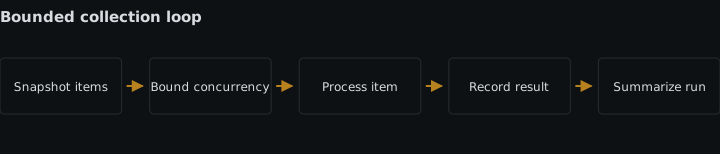
A completed run starts with a fixed snapshot of N assets and processes only those N identifiers. Each identifier has exactly one recorded terminal outcome, successful writes remain available when another item fails, and the success-plus-failure count equals N. Requests reach downstream services sequentially or in bounded batches that stay within their current limits.
Sources
- PowerFlow build guidecloudinary.com
- PowerFlow block referencecloudinary.com
- Admin API documentationcloudinary.com
See also
How no-code builders upload and deliver media: pre-built integrations, plain transformation URLs, one shared credential, and where signed requests stop.
Separate flow success from webhook delivery, stop duplicate processing, and log each attempt without exposing secret-bearing destination URLs.
Build an image-aware media flow that stores alt text and generation state per language, skips decorative images, and retries locales independently.
Editing a media automation flow is write access to every future asset. What that permission covers, where roles start on the plan ladder, and how to review it.