Enforce a Media Format Policy in No-Code Uploads
- Author
 Joseph TrasattiMember of technical staff
- Published
- Section
- No-Code
- Length
- 7 min read3 sources cited
Enforce a media format policy in three layers: restrict accepted inputs in the upload preset, normalize storage with a concrete incoming format, and apply `f_auto` only to delivery requests. Keeping validation, conversion, and browser-aware selection separate prevents rejected files from being mistaken for convertible ones.
Prerequisites
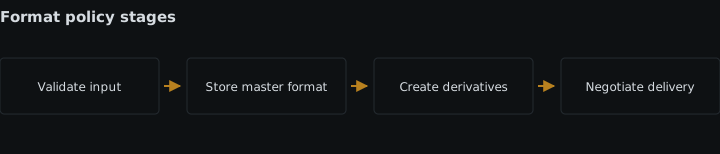
You need access to the upload preset used by the no-code workflow and control over the delivery URL or transformation that the published application requests. Write down three decisions before changing the flow: which source formats users may submit, whether accepted assets must be converted before storage, and whether delivery should choose a format for each browser.
If the builder cannot bind an upload preset and cannot change the delivered asset URL, it cannot enforce all three layers. That is a concrete sign that the workflow is approaching the point where no-code stops being enough.
The examples below use jpg,png as an illustrative input allowlist and JPEG as the stored format. Replace them with formats your application has actually tested.
Steps
-
Define the policy as three independent rules
Record the policy in a form that can be checked without interpreting a flow diagram:
- Allowed inputs:
jpg,png - Stored output: JPEG
- Browser delivery: automatic format selection
These are separate controls because they answer separate questions. The input rule decides whether an upload is valid. The stored-output rule decides whether an accepted asset is converted. The delivery rule decides which representation to return for a particular request.
Do not collapse them into “use JPEG” or “use automatic format.” Neither statement says whether a PNG may enter the system, whether the original is retained as PNG, or whether a browser can receive another format. If retaining the submitted format is a requirement, leave stored output unchanged and apply format changes only to derived or delivered assets. If every stored original must have one format, choose that format explicitly and accept that the stored asset will no longer retain the source encoding.
- Allowed inputs:
-
Enforce the input allowlist in the upload preset
Open the preset used by the no-code uploader and set
allowed_formatsto the formats in the first policy rule. For the example, that isjpg,png. Bind that preset to the actual upload action rather than merely configuring an unused preset.Cloudinary’s upload-preset controls and security guidance, checked 26 August 2026, identifies
allowed_formatsas the restriction for accepted file formats. Treat it as validation: a format outside the allowlist should fail the upload. Surface that failure through the workflow’s error path so the user learns which formats are accepted instead of seeing a later publishing failure.Do not substitute conversion for validation. “Can be converted” and “is permitted as input” are different conditions. A policy that permits JPEG and PNG should not silently admit every other supported source merely because the workflow can produce JPEG from it. Conversely, permitting PNG does not require retaining PNG in storage; conversion is configured separately in the next step.
The cost of a narrow allowlist is deliberate rejection. It is the wrong rule when upstream producers must submit additional formats that the team has not yet added to the contract. In that case, change and test the policy rather than adding an unrecorded bypass branch.
-
Set a concrete stored output with an incoming transformation
If the policy requires one stored format, add an incoming transformation to the preset and name the output directly. For the example, use
f_jpg. An accepted PNG passes the allowlist and is then converted to JPEG before storage; an input rejected by the allowlist does not become valid merely becausef_jpgexists.The format transformation reference, checked 26 August 2026, defines
f_<supported format>as the explicit format instruction. Use the exact format required by the storage contract, such asf_jpg,f_png, or another tested supported format.Do not put
f_autoin this incoming transformation. There is no requesting browser during upload, so no request context exists from which to choose a browser-compatible format. “Automatic” therefore cannot satisfy a requirement for a predictable stored original.This normalization is the right answer when downstream steps require one known stored format. It is the wrong answer when the submitted encoding must be retained. In that case, keep the accepted original and move conversion into eager derivatives or delivery requests. That preserves the distinction between what entered the workflow and what consumers receive.
-
Name every upload-time derivative explicitly
Check the preset for eager transformations as well as the incoming transformation. Eager transformations run without a browser request, so each required result must name a concrete format. If a downstream channel needs JPEG, request
f_jpg; if another requires WebP, requestf_webp. Do not addf_autoto either eager or incoming transformations.The mechanism is simple: upload-time processing can create the output you specify, but it cannot ask a future browser what that browser supports. Concrete formats make the workflow’s output inspectable and let the next no-code block rely on a named artifact.
Generate only variants with an identified consumer. Each additional eager output is another artifact the workflow must track. If the requirement includes video containers and codecs, specify those independently rather than treating “format” as the whole policy; use a dedicated no-code video transcoding pipeline for that case.
Fixed upload-time outputs are wrong when the only requirement is efficient browser delivery. Creating a predetermined browser format early removes the request context that automatic selection needs and creates a derivative even when no consumer requests it.
-
Apply automatic selection to the delivery request
Add
f_autoto the delivery URL or request-time transformation used by the published page. Do this after upload and storage rules are complete. Cloudinary’s image format optimization documentation, checked 26 August 2026, states that automatic format selection is resolved per request at the CDN from the requesting browser. It also warns against placingf_autoin incoming or named transformations.This is why automatic delivery format selection belongs at request time: two requesting browsers may advertise different format support, while the stored asset and its public identity remain the same. The flow should therefore save a stable asset reference and construct the browser-facing URL with
f_autowhen the asset is rendered.Do not assert that
f_autowill return one particular format. The result depends on the requesting browser and the formats enabled for the product environment. If a non-browser consumer requires a fixed file type, request that concrete format instead. The broader configuration pattern is covered in automatic format and quality selection. -
Test each layer independently
Run a small acceptance matrix through the same no-code entry point that users will use:
- Upload one allowed file already in the target stored format. Confirm that the upload succeeds and the stored format matches the policy.
- Upload one allowed file in a different source format. Confirm that it succeeds and the incoming transformation creates the required stored format.
- Upload one format outside the allowlist. Confirm that it follows the rejection path rather than reaching conversion or publication.
- Request an accepted asset through the fixed-format delivery path, if one exists. Confirm that the response uses that requested concrete format.
- Request the browser-facing URL containing
f_autofrom the browsers the application supports. Inspect the returned media format rather than assuming every browser receives the same result.
This separates failures that otherwise look alike. An input rejection is an allowlist result; an unexpected stored format is an incoming-transformation result; and an unexpected browser response is a delivery configuration result. Route those outcomes explicitly if the flow uses branching conditions for upload success and failure.
-
Remove paths that bypass the policy
Check every upload entry point, including administrative forms and replacement-asset actions, and ensure each invokes the intended preset. Then check every published-media path and ensure browser-facing requests add the delivery-time transformation.
A correctly configured preset does not govern a workflow that never selects it, and a correct
f_autodelivery template does not affect a raw stored URL sent by another branch. The review is complete only when accepted inputs, stored outputs, and delivered responses all travel through their respective controls.
Expected result
The completed workflow rejects source formats outside the recorded allowlist, applies a concrete incoming format when storage normalization is required, and never uses f_auto during upload-time processing. Browser-facing requests apply f_auto at delivery time, where the requesting browser is available to inform format selection. Fixed-format consumers continue to request an explicit format.
Sources
- upload-preset controls and security guidancecloudinary.com
- format transformation referencecloudinary.com
- image format optimization documentationcloudinary.com
See also
Partner-built connectors make social publishing a configured step; the automation still owns derivatives, approval gates, credential failures and asset naming.
Enforce separate file-size, image-dimension, video-duration, and format limits in no-code uploads without relying on client-side checks.
Build a visual transcoding flow that waits for every required rendition, verifies failures, and publishes only complete video sets.
Connect a media flow’s canvas and run records to downstream logs using redacted block data, outcomes, retries, timing, and correlation IDs.