Fix rate limits in no-code automations
- Author
 Joseph TrasattiMember of technical staff
- Published
- Section
- No-Code
- Length
- 6 min read3 sources cited
Count downstream calls across every loop and parallel branch, not by visible blocks alone. On a 429, wait for Retry-After when it is present; otherwise retry with jittered backoff. Set a maximum retry age tied to the business event, then stop, record, and route work that has become stale.
Symptom: a normal flow suddenly produces 429s
A block succeeds when tested alone, but the enabled flow receives 429 responses when a collection grows or several paths run together. The downstream service sees a burst even though every visible block appears to make only one call.
Likely cause. Parallel branches and collection loops multiply request rate. A collection runs the calling block once for each item, while parallel branches can make their calls at the same time. In the simple case where each block makes one request, the useful accounting model is:
requests per trigger = collection items × calling branches
That is per trigger, not per minute. Trigger overlap can add another layer of concurrency. Counting blocks on the canvas therefore understates the rate received by the downstream service.
Cloudinary’s MediaFlows flow-building documentation, updated August 18, 2026, shows that one block can connect to multiple downstream blocks that execute in parallel. It also shows how to inspect an execution and the blocks it ran. The visual shape is convenient, but it can hide the combined request rate unless you trace every path.
Check. Pick one failed execution rather than reading the canvas in isolation. Record the number of collection items, identify every branch containing a downstream call, and count the calls made by each item. Then inspect execution timestamps and block outputs to see whether those calls were clustered around the 429 responses.
Repeat the check with the smallest representative collection and with the largest collection the business event can produce. This is especially important for spreadsheet-driven bulk ingestion, where the row count directly changes how often a calling block runs. If the calculated call count does not match the observed count, trace nested collections and branches again before changing retry settings.
Fix. Reduce the multiplication where it occurs. Run collection items sequentially or with bounded concurrency, and avoid placing separate downstream calls on parallel branches unless the downstream rate budget can accommodate their combined rate. Where branches can share one result, make the downstream call before the split and pass its result to both paths.
Do not treat retries as the first fix for excessive concurrency. A retry moves the request; it does not remove the original fan-out. First bound the number of calls that can be active together, then add retry handling for the 429 responses that can still occur.
If the no-code builder cannot express bounded concurrency or preserve the response data needed for correct retry handling, compare the hosted flow with a hand-written webhook handler. The visual flow is the wrong place for this call when its execution model prevents you from controlling the rate received downstream.
Symptom: retries keep colliding with the limit
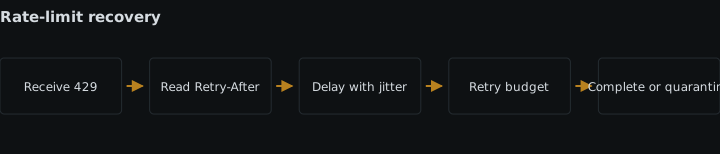
The flow receives a 429, retries, and receives another 429. Several delayed executions may also retry together, producing another cluster instead of spreading their calls.
Likely cause. The retry path either ignores the downstream wait instruction or uses the same fixed delay for every failed execution. RFC 6585, published in April 2012, defines 429 as Too Many Requests and says the response may include Retry-After to indicate how long the client should wait before making another request.
When Retry-After is absent, an identical delay can cause executions that failed together to return together. The AWS Builders’ Library guidance on retries and jitter explains the mechanism: backoff spaces repeated attempts, while jitter varies their timing so clients do not repeatedly converge on the same retry point.
Check. Open a failed execution and capture three things: the 429 status, the response headers available to the error path, and the timestamp of every attempt. Separate failures into two groups:
Retry-Afterwas supplied. Verify that the next attempt did not start before that wait had elapsed.Retry-Afterwas absent. Compare attempt intervals across several executions. If they are identical and the attempts cluster, the retry path is using a fixed schedule rather than jittered backoff.
This check requires observations from the downstream-call block, not only a final failed-flow notification. Include the response status, whether Retry-After was present, and the attempt timestamp in whatever execution record the builder exposes. Use the same identifiers covered by webhook delivery monitoring so one business event can be followed across its attempts.
If the platform does not expose response headers to the error path, record that as a platform constraint. The flow cannot honor a supplied Retry-After value that it cannot read.
Fix. Give 429 its own error path. When Retry-After is supplied, use that value to schedule the next attempt. Do not replace it with the flow’s default delay.
When the header is absent, use jittered backoff: increase the retry window after each failure, then choose a varying delay within that window for each execution. The required property is that repeated failures wait longer while executions that failed together do not all choose the same next-attempt time.
Keep other response types on their appropriate error paths rather than sending every failure through the rate-limit retry. This preserves a specific answer to a specific condition: Retry-After wins when the server supplies it; jittered backoff is the fallback when it does not.
Symptom: old work succeeds after it has stopped mattering
The rate-limit handling eventually gets a request through, but the request belongs to a business event that is no longer valid. The automation has converted a temporary downstream limit into stale work.
Likely cause. The flow limits attempts, if at all, without setting a maximum retry age. Attempt count and age are different controls: the elapsed time can grow whenever Retry-After or backoff delays an attempt. Without an age boundary, delayed work can outlive the business event that created it.
Check. Choose the business event that triggered the flow and state when work from that event stops being useful. That condition supplies the deadline; it should not be an arbitrary retry duration chosen only because the builder accepts it.
Carry the event creation time or an explicit expiry time with the execution. For each retry, compare the planned next-attempt time with that deadline. Also inspect the oldest completed and pending retries. If any attempt begins after the event’s validity ended, the flow lacks an effective maximum retry age.
Do this check before enabling a newly built flow, alongside the normal tests in a first media automation flow. A successful block response is not sufficient when it arrived too late to serve the event.
Fix. Set a maximum retry age tied to the business event. Before scheduling a delay and again before making the downstream call, calculate the work’s age. If the next Retry-After wait or jittered-backoff delay would carry it beyond the deadline, stop instead of retrying. Record the work as expired and send it down the flow’s deliberate stale-work path.
An attempt limit can remain as a second guard, but it cannot replace the age check. The operational rule is direct: honor Retry-After when present, use jittered backoff when absent, and perform either retry only while the event remains valid.
Sources
- MediaFlows flow-building documentationcloudinary.com
- RFC 6585, published in April 2012rfc-editor.org
- AWS Builders' Library guidance on retries and jitteraws.amazon.com
See also
Set width candidates, selection hints and image dimensions in a CMS or visual builder so browsers download an appropriate image without client-side logic.
How to add a scheduled reconciliation to a per-event Cloudinary automation so missed webhooks, failed runs and untriggered uploads still get processed.
Define, test, and version OpenAPI schemas so connector changes do not silently break existing no-code flows.
Store credentials by reference, keep them out of every output surface, and rotate them without breaking a production no-code automation.