Connection References vs Environment Variables
- Author
 Joseph TrasattiMember of technical staff
- Published
- Section
- No-Code
- Length
- 13 min read3 sources cited
Use connection references for connector credential bindings and environment variables for target-specific configuration such as URLs, identifiers, flags, or secret references. Both move with a solution, but each target supplies its own bindings and values. Keep credentials in managed connections or secret stores, never ordinary variable values.
The short answer
Use a connection reference when a flow action needs an authenticated connector. Use an environment variable when an app or flow needs configuration that changes between development, test, and production: a URL, identifier, feature flag, environment label, data-source parameter, or reference to a managed secret.
They are complementary solution components, not two interchangeable ways to store the same value. A connection reference points a flow action to a connector credential binding. An environment variable supplies configuration to the component consuming it.
That boundary matters during deployment. Both definitions can travel with a solution, while the target environment provides its own connection IDs and configuration values during import or automated deployment. The deployable solution says what bindings and settings it requires; it should not carry production credentials or assume that development identifiers also exist in production.
Microsoft’s environment-variable overview for Power Platform solutions, last updated 2026-01-09, describes environment variables as parameter definitions and values consumed by apps, flows, plug-ins, and other solution components. The definition belongs in the solution, while the value should normally be supplied for the target environment during deployment.
They solve different deployment problems
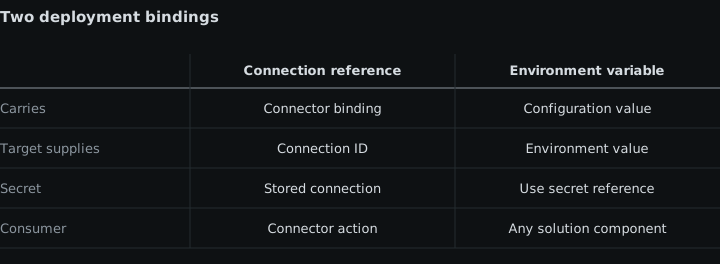
| Criterion | Connection reference | Environment variable |
|---|---|---|
| What it represents | A solution component pointing to a connection for a specific connector | A named configuration definition whose value is consumed by solution components |
| What the flow receives | An authenticated connector binding for its actions or triggers | A value such as a URL, identifier, environment label, flag, data-source parameter, or secret reference |
| What travels with the solution | The reference and its connector relationship | The variable definition and, if deliberately included, a default or current value |
| What the target supplies | A connection ID for a connection available in that environment | The configuration value appropriate to that environment |
| Where credentials belong | In the platform-managed connection behind the reference | Outside an ordinary value; use a managed secret reference when configuration must locate a secret |
| Wrong choice when | The flow merely needs a configurable value and no connector authentication | A connector action needs a credential binding rather than a parameter |
The practical rule is to classify the dependency before configuring deployment. Ask whether the flow needs permission to call through a connector or needs a value telling it what to call, select, or enable. Permission points to a connection reference. Configuration points to an environment variable. A single action can need both.
Connection references bind actions to credentials
A connection is a stored authentication credential for a connector. A connection reference is the solution component that points to that connection. Solution-aware flows bind connector actions to the reference instead of binding directly to one maker’s development connection.
Microsoft’s connection-reference guide, last updated 2026-01-09, says that a target connection is provided for each connection reference during solution import. That indirection is the mechanism that lets the same flow definition use one connection in development and another in production.
Suppose a flow contains four actions using the same authenticated connector. The actions can use one connection reference, and that reference can be bound to an appropriate connection in each target environment. The target does not need four copies of the credential binding. If the connection must change, the operator changes the reference’s underlying connection rather than editing every action.
The price of that indirection is target-side connection preparation. Before import or automated deployment can finish, the target environment needs a usable connection. The deployment must know its connection ID, and the connection must be usable by the owner of the connection reference. Microsoft documents import-time validation and notes that connections need to be owned by the relevant owner or shared appropriately.
This is therefore not merely a naming convention. The connection has an ownership and permission state outside the solution artifact. A reference can be present and correctly named while the underlying connection is absent, invalid, or unavailable to the person enabling the flow. In that case, changing an environment-variable value cannot repair the binding; the target connection itself needs attention.
Connection references are the wrong answer for values that do not authenticate a connector. A service base URL, a destination identifier, a deployment-stage label, or a feature flag is configuration. Hiding one of those values inside a connection makes the dependency harder to identify and does not give the solution a reusable named parameter.
They are also not a substitute for planning production ownership. Binding a production flow to a maker’s personal connection may satisfy the reference at import time, but it leaves the flow dependent on that connection’s ownership and permissions. Where production continuity requires non-personal ownership, treat that as part of the service-principal ownership design for no-code flows, not as an environment-variable problem.
Environment variables carry target configuration
An environment variable separates a parameter definition from the value used in a particular environment. The solution component gives the setting a stable name and type; development, test, and production can then provide different values without editing the consuming flow or app.
Power Platform supports variable types including text, JSON, decimal number, two-option values, data sources, and secrets. The relevant choice here is not the type alone but the role of the value. URLs, identifiers, feature flags, and similar settings are ordinary configuration. A secret-type variable is a route to separately managed secret handling, not permission to paste a credential into a normal text value.
Environment variables can have a default value and a current value. A current value takes precedence when both exist. Microsoft recommends including the definition in the solution while supplying values for the target during deployment. A current value can be removed from the solution before export so the source environment keeps its setting without sending that setting to the destination.
That mechanism makes environment variables suitable when the solution shape remains fixed but external references differ. A flow can keep the same actions while production supplies a production URL and test supplies a test URL. A feature can be enabled in one environment and disabled in another without maintaining two flow definitions. Several components can consume the same variable, so changing one target value updates their shared configuration rather than requiring separate edits.
The concrete cost is configuration management. Each target needs a complete, valid set of values. A missing value can leave dependent components unable to operate, and the platform shows notifications for variables without values. Value validation also depends on the user interface or consuming component rather than occurring universally in the underlying data store, so an automated deployment must provide values in the form the consumer expects.
An environment variable is the wrong answer when the value is relational data rather than a key-value setting. It is also wrong when the dependency is a connector credential. Microsoft explicitly distinguishes data-source environment variables from connections: a connection supplies authentication, while the environment variable supplies parameters the connector action still needs.
SharePoint shows the distinction cleanly. The authenticated connection establishes who can use SharePoint. Separate data-source variables identify the site and list. A production deployment may therefore bind a production SharePoint connection through a connection reference and provide production site and list parameters through environment variables. Neither component replaces the other.
Do not use an ordinary environment-variable value merely because a value changes by environment. If what changes is a credential, the decisive condition is secrecy and authentication, not variability.
Both move, but target-specific data does not disappear
Putting both components in a solution does not make target setup automatic by itself. The solution carries the connection-reference definitions and environment-variable definitions. At import, the target must map references to its connection IDs and supply its configuration values.
For an interactive import, the platform can prompt the operator for this information. That is workable when a person is deliberately promoting a small solution and can inspect the target. It is the wrong operating model for an unattended pipeline because the deployment stops for input and relies on the operator selecting the intended connection and values.
Microsoft’s Build Tools deployment-settings procedure, last updated 2022-02-25, describes a JSON deployment settings file with separate ConnectionReferences and EnvironmentVariables sections. Each connection-reference entry identifies its logical name, connector, and target ConnectionId; each environment-variable entry identifies its schema name and target value. Passing that file to the import task pre-populates the target-specific information.
The settings file does not erase the distinction between the two components. It records both kinds of deployment decision in one place:
-
A connection-reference entry answers: which existing target connection should satisfy this connector binding?
-
An environment-variable entry answers: what target-specific configuration should this named parameter supply?
This arrangement supports repeatable imports because the pipeline can use a settings file prepared for the intended target. Development, test, and production can share one solution artifact while using different connection IDs and configuration values. That is the safe shape to preserve when importing and exporting no-code flow definitions: stable definitions move forward, while target bindings are resolved at deployment.
The engineering cost is maintaining those target mappings. A new connection requires its target ID to be obtained and placed in the deployment configuration. A new environment variable requires a value for every target that needs one. Renaming or removing a component also requires the deployment settings to remain aligned with the solution.
Do not confuse repeatability with portability without preparation. A solution can be structurally portable and still fail to activate if the target has no usable connection. It can import successfully and still behave incorrectly if a URL or identifier points at the wrong target resource. Automated deployment removes manual prompts; it does not remove the need to provide correct target data.
Keep credentials outside ordinary values
Credentials should remain outside the ordinary environment-variable values shipped with or supplied to the solution. Use the platform connection behind a connection reference when authentication belongs to a connector. When a component needs to locate a separately managed secret, use a managed secret reference supported by the platform.
This condition is stricter than “the value differs in production.” Many harmless values differ by environment. A production URL can be an ordinary variable. A list identifier can be an ordinary variable. A feature flag can be an ordinary variable. A password, client secret, or access token is a credential and should not be treated as ordinary configuration.
Power Platform’s environment-variable documentation says exported current values are separated into JSON files and can be edited offline. It also defines a Secret type that requires additional Azure Key Vault configuration. Those facts give the deployment boundary: do not place credentials into normal text or JSON values when a managed secret reference or platform connection can keep the secret outside the solution artifact.
A secret reference and a connection reference still solve different problems. A connection reference gives a connector action an authenticated platform binding. A secret reference lets a component retrieve or address a secret managed elsewhere. Choose according to how the consuming component authenticates; do not copy a credential from one mechanism into another merely to make import easier.
For a fuller treatment of rotation, exposure, and ownership boundaries, apply the same rule throughout secret management in no-code automation flows: artifacts and ordinary target configuration may identify what is needed, but the credential itself stays in the managed connection or secret store.
A worked deployment split
Consider a solution-aware flow that receives a media job, writes a record through an authenticated connector, and chooses a destination using target-specific configuration.
The connector action should use a connection reference. Development binds that reference to a development connection. Production binds the same reference to a production connection by supplying the target’s connection ID during import or through deployment settings.
The destination URL and destination identifier should be environment variables. Development supplies development values; production supplies production values. If an optional branch must be enabled only in production, its feature flag is another environment variable.
If the flow also needs a credential that the connector connection does not manage, do not add it as an ordinary text variable. Supply a managed secret reference if the platform and consuming component support that route. If the credential is actually the connector’s authentication, keep it in the platform connection and use the connection reference.
The resulting solution has one flow definition, one explicit credential-binding path, and named configuration inputs. The target environment owns the concrete connection and values. Nothing needs to be hard-coded into the actions merely to make the flow differ between development and production.
Common category errors
Putting a URL in a connection reference
A connection reference does not exist to hold arbitrary configuration. If an action needs both authentication and a target URL, use the reference for the connection and an environment variable for the URL. Combining those roles hides which part should change when the solution moves.
Putting connector credentials in a text variable
A text value can carry characters, but that does not make it the correct credential boundary. Ordinary environment-variable values can be included in exported solution material or deployment configuration. Use the managed connection or a managed secret reference instead.
Shipping development values as if they were portable defaults
A default may be useful when the same harmless value is suitable everywhere. It is the wrong shortcut when each target must make a deliberate choice. Remove target-specific current values before export and supply the destination values during deployment.
Assuming the logical reference contains the production connection
The reference travels; the production connection does not become portable merely because the reference exists. The target still needs an appropriate connection ID, ownership, and permission state.
Automating import without maintaining target mappings
A deployment settings file can remove interactive prompts, but empty, stale, or incorrect mappings remain empty, stale, or incorrect. Treat the connection IDs and environment values as required deployment inputs and review them when solution dependencies change.
Which to pick when
Pick a connection reference when a solution-aware flow action or trigger must authenticate through a connector. It gives the action a stable solution-level binding while allowing each target environment to provide its own connection ID. Do not use it merely to carry a URL, identifier, or flag.
Pick an environment variable when the solution needs a named value that changes by environment: a URL, identifier, feature flag, environment label, data-source parameter, or secret reference. Include the definition in the solution and provide the target value during import or automated deployment. Do not put a connector credential into an ordinary value.
Pick both when an action needs authentication and target-specific configuration. Bind the connector through a connection reference, then supply the action’s target parameters through environment variables. This is the normal choice for a flow that must call a connector and select a different site, destination, or operating mode in each environment.
For credentials, pick the platform connection when the connector owns authentication, or a managed secret reference when the consuming component must obtain a separately managed secret. Never choose an ordinary environment-variable value simply because it is convenient to populate in a deployment file.
Sources
- environment-variable overview for Power Platform solutionslearn.microsoft.com
- connection-reference guidelearn.microsoft.com
- Build Tools deployment-settings procedurelearn.microsoft.com
See also
Choose fixed crops for consistent compositions; use content-aware gravity with a manual override when a varied library needs adaptive framing.
How a design-tool plugin keeps a media library as source of record: live placement, publishing back, source vs rendition, who owns latest, who approves.
Limit payloads at every block, keep personal data out of logs, and record exactly what external analysis services receive.
Set up perceptual duplicate detection as a flag-only automation, budget the sweep as an add-on, and stop most duplicates earlier with deterministic public IDs.