Import and export no-code flows safely
- Author
 Joseph TrasattiMember of technical staff
- Published
- Section
- No-Code
- Length
- 7 min read3 sources cited
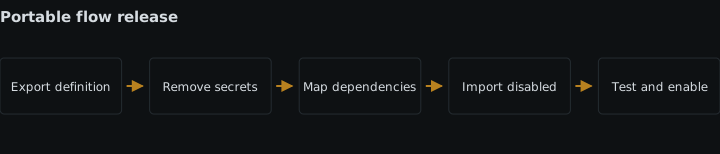
Treat an exported flow as versioned configuration, not a complete deployment package. Remove secrets, record every external dependency, import the definition while disabled, and map destination connections, folders, presets, and webhook targets. Enable it only after fixed-fixture tests confirm that dependencies and outcomes work in the destination environment.
Prerequisites
Before exporting, identify the source and destination environments, obtain access to both, and prepare fixed test fixtures with known expected results. You also need permission to configure the destination connections, folders, presets, and webhook targets used by the flow.
Read the MediaFlows flow-building documentation for the definition you are moving. Exporting preserves a versionable flow definition, but it does not make source-environment dependencies portable. Plan the work as a controlled configuration change: preserve the flow structure, replace its environmental bindings, test it, and only then enable it.
Import the flow safely
-
Export a definition without secret values
Export the flow definition and treat that file as versioned configuration. It should describe the blocks, their configuration, and the connections between them well enough to review changes over time. It should not contain secret values or environment-specific credentials.
Inspect the exported definition before committing, sharing, or transferring it. Search for API keys, tokens, passwords, signing secrets, authorization headers, connection strings, and credentials embedded in URLs. Also look for values copied into ordinary text fields: a secret remains a secret even when the schema calls the field “value,” “header,” or “parameter.”
Follow the OWASP guidance on secrets management: keep secret material outside the versioned definition and provide it through the destination’s secret or connection mechanism. Redacting secrets after committing the file is the wrong workflow because the sensitive value may remain in repository history or transferred copies.
Do not solve portability by replacing a real secret with another environment’s secret inside the export. That still couples the definition to one destination and puts credential material in the artifact. The export should be safe to review as code; the credential should be supplied separately to the destination.
-
Build a dependency manifest from the exported blocks
Read the definition block by block and record every resource that exists outside it. At minimum, classify dependencies into four groups:
Dependency What to record before import Why the definition is insufficient External connection Purpose and destination connection to use The exported reference does not provide destination credentials Folder Intended content boundary and destination folder A source folder identifier may point nowhere, or somewhere inappropriate, after import Preset Required behavior and destination preset The flow can retain a reference without carrying the referenced preset Webhook target Destination URL role and expected environment A copied target can send test or production events to the wrong system Use the MediaFlows block reference while reviewing each block so that dependencies hidden in block settings are not missed. Do not limit the review to blocks with names such as “connection” or “webhook.” Any block setting that refers to something maintained outside the flow belongs in the manifest.
Record purpose as well as the source name. A label such as
upload-connectionis not enough to decide whether the destination equivalent should reach a test service, a production service, or a restricted product environment. Purpose lets the importer map by behavior and access boundary instead of guessing from similar names.This inventory takes engineering time, but it is the part that makes an export usable as a release artifact. An export alone is the wrong handoff when another team must infer which external resources it needs. For a broader ownership transfer, include the manifest in the handover of no-code automation ownership.
-
Review and version the definition together with the manifest
Store the sanitized export and its dependency manifest as one change. Review both before import. The review should answer three separate questions:
- Did the flow structure change intentionally?
- Does every external dependency have an explicit destination mapping?
- Does the artifact remain free of secret values and environment-specific credentials?
Keep credentials out of review notes and mapping documents too. The manifest should name the connection that must be configured, not reproduce the credential behind it. If the flow needs a new secret-management arrangement, resolve that through the process for managing secrets inside no-code automation flows rather than embedding a temporary value in the export.
Reject the change if a reviewer cannot distinguish portable definition data from destination configuration. Versioning an opaque export without a dependency record preserves bytes, but it does not preserve the information needed to deploy those bytes safely.
-
Import the definition but leave the flow disabled
Import the sanitized definition into the destination without enabling it. Import is the point at which the portable structure enters the new environment; it is not proof that the flow is ready to run there.
Before enablement, map every item in the manifest:
- Bind each external connection to the destination connection with the intended scope.
- Replace source folder references with the destination folders that enforce the intended content boundary.
- Select or configure the destination presets required by the blocks.
- Replace every webhook target with the correct destination endpoint.
Work through the manifest rather than fixing whatever fails first. Failure-driven mapping can miss a valid-looking reference that resolves to the wrong resource. A webhook target is the clearest example: a reachable URL can still be the wrong URL.
If a required destination resource does not exist, stop the import process and create or obtain it through the destination’s normal controls. Do not point the flow temporarily at a source resource merely to make validation pass. When this move is part of a larger release, use the same separation of definition and environment binding described in moving an automation from test to production.
-
Run a post-import test with fixed fixtures
After mapping, run the imported flow while it is still not generally enabled. Use fixed fixtures: inputs whose relevant properties and expected outcomes are known before the run. Keep the fixtures stable across environments so a result can be compared with the expected behavior rather than judged by appearance.
Exercise each route that matters to the imported definition. For every fixture, record the expected branch, external dependency, and resulting action. Then compare the observed result with that record. A fixture intended to use a preset should prove that the preset was reached; one intended to deliver a webhook should prove that the mapped target received the expected event; one intended for a particular folder boundary should prove that the destination mapping is correct.
This test detects missing or incorrect dependencies that schema validation cannot see. Schema validation can accept a structurally valid reference even when the referenced connection, folder, preset, or webhook target is absent or wrong in the destination. The fixed fixture forces the flow to use that dependency, which tests behavior rather than shape.
A single happy-path input is the wrong test when the flow has several branches or dependencies. Use the smallest fixture set that reaches every mapped dependency and consequential branch. If a webhook fixture does not arrive, keep the flow disabled and diagnose the target and delivery path; the procedure for monitoring webhook delivery from no-code media workflows covers that boundary in more detail.
-
Enable only the tested definition and mappings
Enable the flow only after every manifest entry is mapped and every fixed fixture produces its expected result. Record which exported version was imported, which destination mappings were applied, and which fixture set passed. Do not make unrecorded mapping changes between the successful test and enablement; doing so means the enabled configuration is no longer the one that was tested.
If any dependency remains unresolved, the correct result is a disabled import with a named blocker. Enabling first and planning to repair failures later exposes real inputs to a configuration that has not demonstrated that it can reach the right resources.
Expected result
The destination contains the intended versioned flow definition without secret values or environment-specific credentials. Every external connection, folder, preset, and webhook target is mapped before enablement. The fixed-fixture test has exercised those mappings and produced the expected outcomes, so the enabled flow is the same configuration that was reviewed and tested.
Sources
- MediaFlows flow-building documentationcloudinary.com
- OWASP guidance on secrets managementcheatsheetseries.owasp.org
- MediaFlows block referencecloudinary.com
See also
Choose where no-code media processing belongs: before storage or before first delivery, without losing originals or doing the same work twice.
Build an asset loop from a fixed snapshot, preserve per-item outcomes, and cap concurrency so downstream APIs stay within their limits.
How no-code builders upload and deliver media: pre-built integrations, plain transformation URLs, one shared credential, and where signed requests stop.
Separate flow success from webhook delivery, stop duplicate processing, and log each attempt without exposing secret-bearing destination URLs.