Signed vs Unsigned Presets for No-Code Uploads
- Author
 Joseph TrasattiMember of technical staff
- Published
- Section
- No-Code
- Length
- 13 min read3 sources cited
Use an unsigned preset when the no-code client must upload directly and a fixed policy can govern every file. Use a signed preset when a trusted backend is available and each upload needs broader parameters. Unsigned flows must treat the exposed preset name as callable and enforce strict guardrails.
The short answer
Pick an unsigned upload preset when the browser or mobile client must upload directly and the same preset-defined policy can govern every request. Pick a signed preset when a trusted backend can generate a signature and the workflow needs the full upload parameter surface.
That is the decision. Unsigned is the client-only route, but its preset name is visible and callers can override only a restricted set of request parameters. Signed adds a backend signing step and supports the full parameter surface. The practical cost of unsigned is stricter preset governance; the practical cost of signed is building and operating the trusted backend step.
Cloudinary’s upload-preset documentation, checked 26 August 2026, describes these two modes directly: unsigned presets serve unauthenticated browser or mobile uploads, while signed presets require an authentication signature and accept all upload parameters.
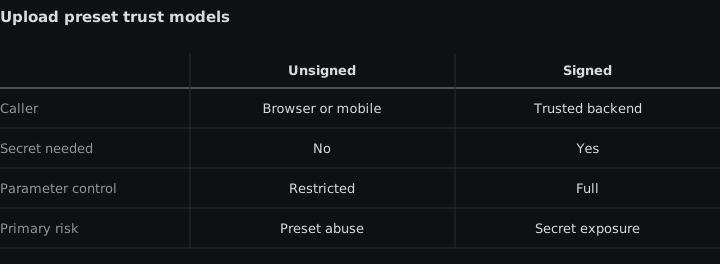
| Criterion | Unsigned preset | Signed preset |
|---|---|---|
| Client path | Supports direct browser or mobile uploads | Requires a trusted backend to create the signature |
| Request control | Callers may override only a restricted set of parameters | Supports the full upload parameter surface |
| Preset exposure | Preset name is visible in client-side use | A valid signature is required for the upload |
| Required controls | Format, size, naming, and transformation guardrails belong in the preset | The trusted backend can choose and sign the required upload parameters |
| Main cost | Less per-request flexibility and more preset-governance work | Backend implementation and operation |
| Wrong choice when | The policy must vary beyond unsigned request restrictions | The no-code stack cannot call a trusted signing backend |
What the preset decision actually controls
An upload preset is the policy applied when a file enters the product environment. In this comparison, the important question is not whether both modes can upload. They can. The question is where authority sits.
With an unsigned preset, authority sits mostly in the preset. The client can start an upload without asking a trusted backend for a signature, but it cannot freely replace the preset’s policy through request parameters. That arrangement suits a public flow with a stable contract: accept only the intended formats, enforce the intended size boundary, apply the intended naming rule, and run the intended incoming transformation.
With a signed preset, authority can be exercised per upload through the trusted backend. The backend creates the signature, and the signed request can use the full upload parameter surface. That arrangement suits a workflow whose upload instructions cannot be reduced to one fixed public policy.
This distinction matters in media handling inside no-code application builders. A visual upload control may make both approaches look like the same drag-and-drop step, but their operating conditions are different. One publishes a constrained upload route to the client. The other makes a trusted service participate before the upload can proceed.
Criterion 1: direct client upload or trusted backend
Unsigned presets: direct browser and mobile flow
Unsigned presets support uploads initiated directly by browser or mobile clients. The no-code application can therefore invoke the upload flow without first obtaining a signature from a backend.
The mechanism is simple: the client sends the preset name with the upload. Because there is no backend-generated signature, the preset supplies the upload policy that the client is allowed to use. The preset is not merely a convenient bundle of defaults in this design; it is the main boundary around what the public upload route accepts.
The engineering cost moves away from backend implementation and into preset design. Someone still has to decide the accepted formats, size boundary, naming behavior, and transformations. Those settings must be correct before the client is released because every visitor using that preset reaches the same policy.
Unsigned is the wrong answer when the upload cannot be governed by that fixed policy. If one request needs parameters that another request must not receive, and those differences exceed what an unsigned caller may override, a direct unsigned flow cannot express the required distinction safely through the request.
It is also the wrong answer if the team is treating the preset name as hidden. Direct client use exposes it. Obscure naming does not change the condition: a visitor who finds the name can attempt an upload.
Signed presets: backend participation
Signed presets require a trusted backend to create the signature. Cloudinary’s programmatic upload guide, checked 26 August 2026, places signature generation on the backend and contrasts it with unauthenticated uploads that do not require that step.
The mechanism changes the workflow boundary. The no-code client cannot complete the signed route using only the preset name. It must obtain the signature produced by the trusted backend. That backend requirement is the defining implementation cost: the team needs somewhere trusted to generate the signature, a way for the no-code flow to call it, and an operational path that keeps working whenever uploads are accepted.
Signed is the wrong answer when the project has no trusted backend capability and adding one is outside the delivery boundary. A no-code builder that can submit a direct upload but cannot call a signing service does not meet the condition for a signed flow. Calling the option signed in configuration does not remove that dependency.
Signed is also unnecessary when every accepted upload follows one fixed, defensible preset policy and the direct browser or mobile route is a requirement. In that situation, backend participation adds engineering work without changing the policy the application needs.
Criterion 2: restricted overrides or the full parameter surface
Unsigned presets centralize policy
Unsigned callers may override only a restricted set of request parameters. Other upload behavior must be defined in the preset. This is both a limitation and the reason unsigned presets can support a direct unauthenticated route.
The limitation is concrete. A no-code workflow cannot assume that any upload option exposed by a generic HTTP block will be accepted in an unsigned request. The request surface is deliberately narrower than the signed surface. If a required choice cannot be passed by an unsigned caller, it has to become part of the preset or the design has to move to signed uploads.
The benefit is consistency. When format, size, naming, and transformation rules live in the preset, a visitor cannot expand the upload policy merely by adding arbitrary request parameters. The no-code screen may collect user choices, but those choices do not create an unrestricted upload request.
That makes unsigned a good fit when variation is small and known in advance. For example, if one public form accepts one defined class of media under one naming and transformation policy, the preset can represent that contract. If the application has several genuinely different fixed contracts, each needs its own governed preset rather than one loosely controlled route.
The cost is change management. A preset edit changes the policy used by every flow that names it. Governing no-code upload presets therefore matters most when unsigned presets are reused: owners must know which public flows depend on each preset and what guardrails those flows expect.
Unsigned is the wrong answer when business logic needs broad per-request variation. If upload parameters must be assembled dynamically for each file and the required fields fall outside the restricted unsigned surface, the preset cannot delegate that choice to the client. The full surface requires the signed path.
Signed presets allow broader per-upload control
Signed presets support the full upload parameter surface. The trusted backend can create a signature for the upload parameters required by that request rather than forcing every choice into one public preset.
The mechanism suits conditional workflows. The no-code layer can collect the context, but the trusted backend is the component that creates the signature for the chosen parameters. This preserves the signed condition while allowing the upload instructions to vary.
The cost is not the parameter count; it is ownership of the signing step. The team must decide which parameters the backend will sign and under what application conditions. Moving to signed uploads provides the full surface, but it does not make those policy decisions automatically.
Signed is the wrong answer when the team has no real use for that broader surface. If the backend always signs the same fixed settings, an unsigned preset with adequate guardrails may represent the flow with fewer moving parts. Choose signed for required control, not because it sounds more serious.
Criterion 3: preset exposure and upload guardrails
An unsigned preset name is callable, not secret
A direct unsigned flow exposes the preset name in client-side use. Cloudinary’s Upload Widget security guidance, checked 26 August 2026, warns that client-side details can be inspected and used to attempt unwanted uploads.
The precise condition is important: anyone who finds the unsigned preset name can attempt an upload. Finding the name does not grant the full signed parameter surface, but it does provide access to the route defined by that preset. The safe design therefore assumes discovery from the start.
This is why an unsigned preset needs four kinds of guardrail:
-
Format: define which media formats the route accepts. The public client should not be able to turn a narrowly intended image flow into a general file-ingestion route.
-
Size: set the accepted file-size boundary in the preset. A client-side warning can help the intended user, but the preset is the shared policy reached by anyone who attempts the upload.
-
Naming: constrain how uploaded assets receive their identifiers. The naming rule must be part of the governed route rather than an unrestricted choice delegated to an unknown caller.
-
Transformation: apply the incoming transformation needed to normalize accepted media. This lets the stored result follow the preset’s policy even though the upload began in an untrusted client.
These controls solve different parts of the same problem. Format determines what kind of input is accepted. Size bounds how large that input may be. Naming governs where the resulting identifier comes from. Transformation governs how the accepted media is normalized. Omitting any one of them leaves that part of the public route undefined.
For deeper implementation decisions, separate the media format policy from the file size, dimension, and duration guardrails. They belong to the same unsigned preset review, but they answer different questions and should not be collapsed into a vague setting labelled secure.
The operational cost of unsigned is therefore continuing governance. The preset must remain narrow enough to expose publicly. If the workflow’s requirements expand, the team must either update that public contract deliberately, create another constrained preset, or move the flow to a signed route.
Unsigned is the wrong answer when no defensible public preset can be written. If the accepted parameters depend on trusted application decisions that cannot be represented as fixed guardrails, exposing a direct unsigned route gives the client more responsibility than the design supports.
A signed preset moves the decision behind a signature
A signed preset still represents upload configuration, but a preset name alone is insufficient: the upload requires the signature created by the trusted backend. That removes the unsigned condition in which any visitor who discovers the name can attempt an upload using that preset alone.
The signed route is appropriate when the application must decide upload parameters from trusted context. It supports the full upload parameter surface, so the workflow does not have to expose broad choices through an unsigned client request.
The trade-off remains backend dependence. If the signing service is unavailable to the no-code flow, the signed upload cannot satisfy its defining requirement. The no-code platform must be able to call the trusted backend and use its result in the upload step.
Signed is not a substitute for deciding format, size, naming, and transformation policy. It changes where those decisions can be applied and authorizes the broader parameter surface. The team still has to state which files and settings each application condition should allow.
Common no-code situations
Public form with one fixed media policy
Pick an unsigned preset when a public browser or mobile form must upload directly and every accepted file can follow one predefined policy. Put the format, size, naming, and transformation guardrails in the preset before publishing the flow.
The preset name will be visible, so review the route as if an unintended visitor will find it. If the flow is acceptable only while the name remains obscure, it is not ready for unsigned use.
No-code application with per-upload rules
Pick a signed preset when upload parameters must vary per request and the required choices need the full upload parameter surface. The no-code client must call a trusted backend that creates the signature.
The wrong implementation is a nominally signed design with no trusted signing step. If the builder cannot make that call, either add an in-scope backend integration or reduce the workflow to a fixed unsigned policy with adequate guardrails.
Builder without backend capability
An unsigned preset is the workable choice only if its restricted request surface and fixed guardrails can express the whole upload policy. The lack of a backend does not make unsigned suitable by itself; it merely removes signed uploads from the current architecture.
If the required behavior cannot fit inside the preset, stop rather than shifting unsupported parameters into the public client. The choices are to narrow the feature, introduce a trusted backend, or select a builder arrangement that can call one.
Several fixed upload contracts
Do not make one unsigned preset broad enough to cover unrelated inputs merely to keep the preset count low. Treat each public preset as a callable contract. Separate contracts are justified when their format, size, naming, or transformation guardrails differ.
That creates more presets to govern, but it keeps each exposed route aligned with one stated use. If the number of conditional variations makes those presets difficult to reason about, that is a signal that a signed backend decision may fit the workflow better.
A review sequence before publishing
Start with the client path. If direct browser or mobile upload is mandatory and no trusted backend will participate, evaluate unsigned. If a trusted backend is available and broad per-upload control is mandatory, evaluate signed.
Next, list the upload parameters the flow actually needs. For an unsigned design, confirm that every non-overridable choice can live in the preset. For a signed design, confirm that the trusted backend can create the signature for the required parameter set.
Then review exposure. For an unsigned design, assume the preset name will be found and used in an upload attempt. If that assumption changes the answer, the preset is too permissive or the flow should be signed.
Finally, inspect the four unsigned guardrail categories separately:
- Which formats may enter?
- What size boundary applies?
- How is naming constrained?
- Which incoming transformation normalizes the asset?
A complete answer to three of those questions does not cover the fourth. The unsigned route is ready only when all four conditions are explicit.
Which to pick when
Pick unsigned when the no-code browser or mobile client must upload directly, the workflow can operate within the restricted request-parameter surface, and one preset can enforce the complete format, size, naming, and transformation policy. Accept that the preset name is visible and design it so any visitor who finds it can attempt an upload without escaping those guardrails.
Pick signed when a trusted backend is available and the workflow needs the full upload parameter surface or parameters chosen per upload. Budget for building and operating the signature step; without that trusted backend, the signed design is incomplete.
If both conditions appear in the same product, decide per upload flow. Use unsigned only for the narrow, fixed public contract. Use signed for the flow whose parameters require trusted, per-request control.
Sources
- upload-preset documentationcloudinary.com
- programmatic upload guidecloudinary.com
- Upload Widget security guidancecloudinary.com
See also
How strict transformation allowlists block unknown no-code delivery variants, preserve approved ones, and change the release process.
How to test a media automation safely: a separate product environment, a representative asset set, and failure branches broken on purpose before it goes live.
Configure public access windows or signed media URLs without letting clock skew or caches extend access.
How to set up a MediaFlows PowerFlow that deletes rejected user uploads after a grace period, covers derived copies, and logs every deletion for later evidence.