Use Generative Fill Safely in No-Code Workflows
- Author
 Joseph TrasattiMember of technical staff
- Published
- Section
- No-Code
- Length
- 12 min read3 sources cited

Treat generative fill as a derivative-making step, never evidence. Keep the untouched original, log the exact transformation and prompt, route any result that could change product shape, context, claims, or brand details to a human, and publish only an approved derivative whose lineage remains traceable.
Prerequisites
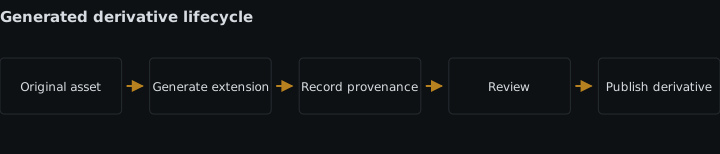
Before enabling generative fill, confirm that the workflow can do four things separately: retain an untouched source asset, create a derivative without overwriting that source, store a transformation record, and pause delivery for human approval. If the no-code platform cannot preserve those boundaries, keep generative fill outside the publishing path.
Assign an owner for the review queue and decide which asset classes may use generated pixels. The owner does not need to edit every image, but someone must be able to reject a derivative, send it back for another transformation, and trace it to its source.
Build the workflow
-
Classify the asset before generating anything
Generative fill is not ordinary resizing. Cloudinary’s generative fill documentation, last updated 22 July 2026, describes it as extending an image into padded areas by generating visually realistic pixels in one or both dimensions. A prompt can guide what appears there.
Those pixels were not captured by the camera or present in the uploaded file. Generative fill therefore creates new content outside or around the source and cannot be treated as documentary evidence. A realistic result does not change that condition.
Make classification the first workflow branch, before a prompt or transformation is assembled:
Asset condition Workflow decision Reason The complete image may be used as evidence of a scene, event, product condition, inspection, result, or before-and-after state Do not use generative fill Generated surroundings could be mistaken for observed content Generated edges could touch or visually continue a product, package, person, logo, label, or meaningful object Allow generation only with human review The new pixels may alter shape, context, claims, or brand details The source must fit a new aspect ratio, but cropping would remove necessary source content Generate a separate candidate derivative Fill can preserve the source region while creating the missing canvas A plain border or ordinary crop meets the layout requirement Use that deterministic operation instead Generative fill adds uncertainty without answering a requirement This gate costs some workflow design and may exclude attractive uses. That is the point: the decision should depend on what the image is expected to prove, not on whether the generated area looks plausible. It is the wrong gate only when every asset is already restricted to decorative use and no generated edge can affect meaning; even then, keep the original and transformation record.
-
Store the original as a separate, durable object
Ingest the source before creating any generated variant. Give it a stable asset identifier and mark its role as
originalor the equivalent in the no-code platform. Do not let a later fill step update the same record or replace the source file.Cloudinary’s image transformation documentation, last updated 26 June 2026, describes transformations as producing variations from an original and calls a newly generated variation a derived asset. Preserve that distinction in the workflow even if the no-code connector presents upload and transformation as one combined action.
The source record should retain:
- the platform’s source asset identifier;
- the source version, if the platform exposes one;
- the original filename and media type;
- a digest or checksum, if available, so later checks can establish byte identity;
- the ingestion time and originating workflow run;
- the usage classification from step 1.
A filename alone is not enough because it can be reused. A delivery URL alone is also weak lineage if replacing an asset can change what that URL returns. The durable link should point from each derivative record back to the specific source version.
This design consumes storage for the original as well as any retained derivatives. It also leaves assets that must be governed independently. That cost is necessary when rollback, audit, or comparison matters. Overwriting the source is the wrong shortcut: once the original pixels are gone, a reviewer cannot determine which parts were captured and which were generated.
If the upload begins inside an application builder, make source persistence part of the broader design for media handling inside no-code application builders, rather than assuming the visual workflow owns the only copy.
-
Build a complete transformation record
Create the recipe before calling the fill operation. Store it as structured fields alongside the derivative rather than burying it in a run log that may be deleted or difficult to query.
Record at least:
- the source asset identifier and version;
- the requested width, height, or aspect ratio;
- the padding mode and placement or gravity;
- the generative fill action;
- the exact prompt, including an explicit value indicating that no prompt was supplied;
- the seed when one is set;
- every transformation applied before generative fill, in order;
- the workflow and recipe revision;
- the execution time and resulting derivative identifier.
The prompt is required provenance, but it is not the whole recipe. Cloudinary states that the same prompt and the same preceding transformations produce the same filled background, while changing the seed produces a different result. It also says reproduction requires the same seed and preceding transformation parameters. Recording only “extend background” would not identify the operation that produced the pixels.
Keep prompts limited to what the transformation needs. Do not copy unrelated form fields, user profiles, or private notes into them. If values arrive from other no-code blocks, apply the same field-level rules used for data minimization across no-code media automation blocks.
A fixed prompt template is useful when the desired composition is stable. It becomes the wrong answer when a variable can inject unreviewed instructions or when the template implies facts that are not in the source. In those cases, restrict the variables or omit generative fill.
-
Generate a derivative without putting it directly on the delivery path
Run generative fill against the stored source and write the result to a new derivative record. Its initial state should mean “generated, not approved,” not “ready.” A successful transformation request proves only that a file was produced.
In Cloudinary, generative fill works with padding modes and can extend width, height, or both. Gravity controls where the original sits within the padded canvas. As documented on 22 July 2026, it supports non-transparent images but not animated or fetched images. Generating a derived version can temporarily return HTTP 423 while it is being prepared; an incoming transformation can return HTTP 420 with
pending. Generative fill also has a special transformation count, although no monetary amount is established by the supplied sources.Handle those conditions explicitly:
- Treat a pending response as pending, not as rejection and not as approval.
- Retry through the platform’s supported waiting mechanism rather than submitting a different recipe silently.
- Preserve the intended recipe across retries.
- Route unsupported input types to a deterministic fallback or a manual editing queue.
- Record the final derivative identifier only after generation completes.
Choose the execution point according to the delivery condition. Prepare an eager derivative when the image must already exist before publication and a first-request wait would be unacceptable. Generate on demand only when the caller can handle a pending result without exposing a broken or incomplete state. An incoming transformation must not become the only retained representation of the upload.
Eager generation costs processing for variants that might never be published. On-demand generation moves waiting and failure handling into the request path. Incoming processing can simplify a fixed ingestion pipeline but is wrong when it obscures the untouched source. The fuller decision is covered in incoming versus eager transformations.
-
Route meaning-changing edges to a human
Human review is warranted whenever generated edges can alter product shape, context, claims, or brand details. Express those four conditions as workflow rules, not as a note that operators are expected to remember.
- Product shape: Require review when generated pixels touch, continue, hide, or create a boundary that a buyer could read as part of the product. The reviewer compares the silhouette in the source with the derivative.
- Context: Require review when the new area could change where, when, or how the subject appears to be used. A plausible setting is still generated context.
- Claims: Require review when generated objects, text-like marks, badges, quantities, accessories, results, or surroundings could imply a feature or outcome. If removing the generated area changes what the image appears to promise, the derivative needs review.
- Brand details: Require review when the filled region approaches a logo, package, distinctive pattern, product colour boundary, label, or other controlled visual element. A prompt describing the brand does not make the generated detail authoritative.
Show the reviewer the original and derivative together. Mark the source boundary if the platform can do so without changing the files, and provide the complete transformation record. Review the whole composition as well as the join: an edge can blend cleanly while the new context remains misleading.
The reviewer should return one of three decisions: approve this derivative, reject it, or request a new candidate with an amended recipe. Store the reviewer, time, decision, and reason. Do not replace a rejected file with a new run under the same derivative record; that would detach the decision from the pixels that were actually inspected.
The NIST AI Risk Management Framework is voluntary and was released on 26 January 2023; NIST added a generative-model profile on 26 July 2024 and states that AI RMF 1.0 is being revised. Applied here, its risk-management purpose supports a documented loop that identifies the image’s use, evaluates generated output, assigns a decision, and preserves the result. That workflow adaptation is editorial guidance, not a claim that NIST certifies a particular fill operation.
Human review costs queue time and reviewer attention. It is the wrong control if it is merely ceremonial: a reviewer who sees only the derivative, lacks the source boundary, or cannot reject the result cannot test the relevant risk.
-
Fail closed at the publishing gate
Add a separate publish step after review. The delivery block should accept only a derivative whose identifier has an approval tied to that exact recipe and output. A missing record, changed source version, changed recipe, failed generation, or rejected review must stop derivative publication.
Use the untouched original, a pre-approved deterministic crop, or a plain padded variant as the fallback when one is suitable. Do not silently run a second generative fill because retries with changed inputs would produce an output that was never reviewed.
Where users can construct delivery URLs or transformations outside the workflow, apply strict transformation allowlists for no-code delivery so an approved asset cannot acquire a new unreviewed generative step at request time. The allowlist does not establish visual truth; it keeps delivery within recipes that the publishing process knows about.
This gate gives up some immediacy. It is wrong to bypass it merely because generation completed. Completion, approval, and publication are three different states.
-
Keep brand elements deterministic
Do not ask generative fill to recreate a logo, label, legal line, badge, or exact package detail. Keep controlled brand material inside the source region or add an approved asset or text layer through a deterministic transformation after the fill has been accepted.
Use each method under the condition it suits:
- Crop: Choose it when losing outer source content does not remove something required. It creates no new scene content, but it is wrong when it cuts off the subject or evidence the reader needs.
- Plain padding: Choose it when the layout requires dimensions rather than a natural-looking continuation. It costs visual space and may not suit the composition, but its added area is explicit and predictable.
- Generative fill: Choose it when retaining the source region and extending the surrounding composition is worth the uncertainty and review cost. It is wrong for documentary use or unreviewed meaning-changing edges.
- Manual composite: Choose it when an editor must control every added element. It costs per-asset editing time and is wrong as an automatic substitute when the volume cannot support that work.
Apply logos and controlled copy through the process for standardising branding across media. That keeps an approved brand asset distinct from pixels inferred by a model.
-
Test the workflow as a state machine, not a beauty filter
Run representative assets through every branch before release. Include a documentary asset that must be blocked, a product whose boundary reaches the generated area, a brand detail near an edge, an unsupported input, a pending generation, a rejected derivative, a retry, and an approved low-risk composition.
Verify for each run that:
- the source remains byte-identical when a digest is available;
- the derivative has a different identifier;
- the prompt and full ordered recipe are stored;
- pending generation cannot reach delivery;
- rejection remains attached to the rejected pixels;
- a changed seed or preceding transformation creates a separate candidate record;
- approval of one candidate does not approve another;
- the published output resolves back to its source and decision record;
- the fallback appears when generation or review does not complete.
Also attempt to overwrite the original and to publish a derivative with missing lineage. Both operations should be rejected. A visual spot check alone is the wrong test because it will not expose approval leakage, record replacement, or a delivery block wired to the wrong state.
-
Monitor decisions and control recipe changes
Count generated, pending, approved, rejected, and fallback outcomes. Track missing provenance and attempted source overwrites as workflow faults. These counts show whether the controls execute; they do not establish that generative fill improves productivity or that approved images are error-free.
Treat any change to the prompt template, padding rules, seed handling, preceding transformations, review criteria, or vendor implementation as a recipe revision. Test that revision before it replaces the current one. Existing approvals stay attached to the old derivative and recipe rather than transferring automatically.
Recheck vendor documentation before changing the workflow because supported inputs, response behaviour, transformation accounting, and syntax can change. If a current price or numerical processing limit is needed for an operating decision, verify it separately with a dated source; the supplied evidence does not establish one.
Expected result
Done means every generated image is a derivative with an identifiable untouched original and a stored prompt or complete transformation recipe. Generated pixels are never presented as documentary evidence. Any edge capable of changing product shape, context, claims, or brand details has a recorded human decision, and only the specifically approved derivative can pass the publishing gate.
Sources
- Cloudinary’s generative fill documentationcloudinary.com
- Cloudinary’s image transformation documentationcloudinary.com
- NIST AI Risk Management Frameworknist.gov
See also
Create, document, test, version, and retire upload presets without breaking no-code media workflows that reference them.
Transfer a production no-code flow with its credentials, alerts, limits, recovery runbook, service owner, and tested failure response.
How a media library app integration inside a headless CMS stores references, defers transformation to delivery, scopes folders, and lives or dies on metadata.
Configure no-code HTTP requests with stored secrets, explicit success rules, schema checks, and retries that cannot repeat side effects.